
The most suitable DLP choice is not necessarily the one with the longest feature list. Data Loss Prevention software helps organisations identify sensitive information, monitor how it moves and apply rules to reduce unauthorised sharing or exposure. When comparing dlp software alternatives, look beyond brand names and assess how each option fits your data, systems and security requirements.
Choosing a tool can feel complicated when deployment models, Microsoft 365 capabilities, commercial platforms and open-source options all promise different benefits. The right fit depends on where your data lives, how people use it, the controls your organisation needs and the expertise available to run the solution.
This guide explains DLP’s core functions, then compares vendor and deployment approaches, compliance considerations, Microsoft 365 options, and commercial and open-source software. It also shows how a Dubai-based organisation using Microsoft 365 to share sensitive files across teams might assess its needs, helping you make a practical comparison for your UAE environment.
Key Takeaways
- Start by classifying sensitive data and defining who can access it, how it may be shared, and which endpoints need protection.
- Compare vendors by how their deployment models fit your infrastructure, data flows, and capacity to manage policies and alerts.
- Assess compliance support against the requirements relevant to your organisation; software can support controls but doesn’t replace compliance work.
- For Microsoft 365, consider how native controls fit your environment and whether additional coverage is needed beyond those services.
- Weigh commercial and open-source options against your needs for features, customisation, maintenance, and internal technical expertise.
What Is Data Loss Prevention Software?
Data Loss Prevention (DLP) software helps an organisation identify sensitive information, monitor its movement and enforce rules to reduce data loss. A DLP solution typically discovers and classifies data, monitors activity and applies policy actions. These controls can cover network, endpoint and storage environments.
Start with classification. Label information by business sensitivity, such as public, internal or confidential, then map each category to approved users and handling rules. Access controls define who can view, edit, share or export each type of data. Endpoint security extends those rules to laptops and other devices, including attempts to copy information to removable media. In the UAE, a company handling customer records can use these steps to identify which files need tighter sharing controls.
Next, translate compliance requirements into practical data-handling policies. Identify the information involved, the systems that store or transmit it, and the people authorised to use it. DLP can apply rules to specific data and actions, but it does not replace the organisation’s responsibility to understand its obligations. Policies should reflect real workflows: an approved finance export should be treated differently from an unauthorised upload to a personal account.
Monitoring examines how data moves through email, cloud storage, SaaS applications and network connections. Detection may use content patterns, classification labels or context such as the user, destination and action. When a rule matches, a policy may block a transfer, quarantine an email, restrict access or alert a security team. The response should reflect the risk: a sensitive attachment sent to an authorised colleague may need to be logged, while an external upload may warrant blocking.
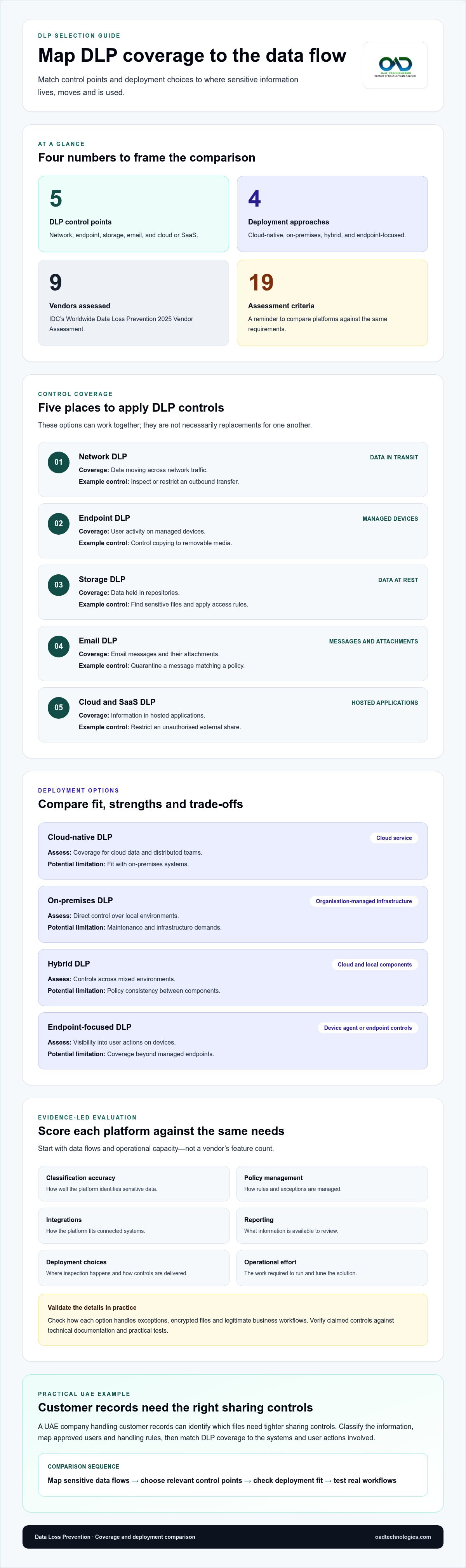
For organisations comparing dlp software alternatives, the table shows how coverage varies by control point. These options can work together rather than serve as direct replacements for one another.
| Option | Primary coverage | Example control |
|---|---|---|
| Network DLP | Data moving across network traffic | Inspect or restrict an outbound transfer |
| Endpoint DLP | User activity on managed devices | Control copying to removable media |
| Storage DLP | Data held in repositories | Find sensitive files and apply access rules |
| Email DLP | Messages and attachments | Quarantine a message matching a policy |
| Cloud and SaaS DLP | Information in hosted applications | Restrict an unauthorised external share |
Choose coverage by mapping sensitive data flows first, then matching controls to the systems and user actions that create exposure. A dedicated data loss prevention solution can support policy-led monitoring across those workflows.
To migrate from an existing DLP tool, inventory its policies, exceptions, integrations and alert patterns, then map each requirement to the replacement. Pilot the new controls in monitoring mode, tune false positives and introduce enforcement across systems in stages. Retain the old configuration during the transition so it is available for rollback.
DLP vendor comparison and deployment models
Compare platforms by the data they cover, the controls they enforce and the work required to operate them. A product may offer strong endpoint monitoring but limited visibility across cloud applications. Another may provide broader coverage while requiring careful policy tuning. Start with your data flows, not a vendor’s feature count.
IDC’s MarketScape: Worldwide Data Loss Prevention 2025 Vendor Assessment evaluated nine vendors against 19 criteria. Use a similar evidence-led method: define essential capabilities, then score each platform against the same requirements. Assess classification accuracy, policy management, integrations, reporting, deployment choices and operational effort. Ask how each option handles exceptions, encrypted files and legitimate business workflows.
| Option | Deployment | Strength to assess | Potential limitation |
|---|---|---|---|
| Cloud-native DLP | Cloud service | Coverage for cloud data and distributed teams | Fit with on-premises systems |
| On-premises DLP | Organisation-managed infrastructure | Direct control over local environments | Maintenance and infrastructure demands |
| Hybrid DLP | Cloud and local components | Controls across mixed environments | Policy consistency between components |
| Endpoint-focused DLP | Device agent or endpoint controls | Visibility into user actions on devices | Coverage beyond managed endpoints |
Deployment affects more than hosting: it determines where inspection happens, which integrations are needed and how policy changes reach users. An organisation with local servers and cloud collaboration tools, for example, can compare hybrid coverage with separate controls for each environment. Test a representative workflow, such as sharing a sensitive spreadsheet with an external adviser, before selecting enforcement settings.
AI-assisted comparison can organise lengthy feature matrices, identify overlapping capabilities and summarise product documentation. Treat its output as a research aid, not proof. Validate each claimed control against technical documentation and practical tests, especially for classification, alert context and policy exceptions. Record the evidence and any unresolved gaps for each platform.
How much does DLP software cost, and which vendors offer transparent pricing? Pricing depends on user and endpoint coverage, data volume, deployment, integrations and support, and providers give a price after a quote request. Vendors publishing a clear per-user or tiered pricing basis are easier to compare; enterprise deployments often require scope-based quotations.
Which DLP vendors and data-protection rules are relevant to businesses in the UAE? Compare platforms with the UAE PDPL and applicable sector requirements, including CBUAE requirements for relevant financial organisations, ADHICS for healthcare, and DESC ISR or UAE IA/NESA requirements where applicable. Confirm that the product’s controls map to your organisation’s actual obligations, systems and data.
Choose a deployment that covers your priority data flows and can be managed effectively. Before wider adoption, validate it against real user workflows.
Alternatives include cloud-native, on-premises, hybrid and endpoint-focused DLP platforms. Compare their data coverage, policy controls, integrations, operational demands and fit with your cloud and local systems.
GDPR, HIPAA and PCI-DSS compliance support
DLP can make data-protection controls visible, but it does not make an organisation compliant by itself. GDPR, HIPAA and PCI-DSS address different contexts, so map each obligation to the information, systems and workflows it concerns. For an organisation in the UAE, include the UAE PDPL and applicable sector requirements in that mapping. A control that protects payment-card data, for example, may not address how employee or patient records are handled.
Build the map around evidence. Record each data category, where it is stored, who can access it and which DLP control supports its protection. Then connect each control to an owner, a policy and reviewable evidence. For example, a policy restricting external sharing of a confidential file can create an event record showing the action, rule and response. That record supports oversight, but does not prove compliance with every requirement.
Deployment choices affect compliance coverage and operational complexity. An organisation with on-premises systems, cloud storage and remote endpoints needs visibility across those environments. A control applied only to managed laptops may not cover a file shared through a browser-based SaaS application. Map systems and data flows before deployment, then test policies across representative workflows. A healthcare provider, for instance, can test whether a patient document is handled consistently when staff access it from approved devices and cloud services.
Alert fatigue can weaken response. Up to 70% of security alerts go uninvestigated due to alert fatigue. Reduce noise by prioritising events according to data sensitivity, destination and user context. A repeated attempt to send restricted records outside the organisation may deserve escalation; an approved transfer between authorised teams may need logging instead. Review alert outcomes and refine rules so analysts can distinguish a credible threat from routine activity.
Insider risk also requires context. An authorised user can expose sensitive information through an accidental share, an unusual download or a transfer to removable media. DLP alerts show relevant activity, while endpoint monitoring can add device context. Security teams should consider these signals alongside access permissions and approved business processes, rather than treating every unusual action as malicious.
For compliance reporting, organise evidence by control objective, system and owner. A practical review can track:
- Which data categories and endpoints are covered.
- Which policies block, restrict or record data movement.
- Who reviews alerts and how exceptions are approved.
- Where control gaps remain across premises, cloud and SaaS systems.
Use this evidence to review coverage against GDPR, HIPAA, PCI-DSS and relevant UAE requirements. DLP can support data protection and reporting, but compliance mapping must still reflect the organisation’s applicable obligations and operating practices.
DLP tools for Microsoft 365 environments
Microsoft 365 organisations can start by assessing Microsoft Purview DLP against their data flows and control requirements. Purview is Microsoft’s DLP option for its environment, while other enterprise DLP solutions may extend policies across additional cloud services and endpoints. The right fit depends on where information is stored, how users share it, and which systems security teams must monitor.
For a practical assessment, map sensitive information across Exchange, SharePoint, OneDrive and Teams. Identify actions that could create exposure, such as an external email attachment or a broadly shared file. Define which actions should be allowed, logged, restricted or blocked. Test policies against everyday workflows before enforcing them, so approved collaboration does not trigger the same response as an unauthorised transfer.
Microsoft Purview integration can suit organisations that want DLP controls closely aligned with Microsoft 365 workflows. Assess how its policies, administration and reporting fit existing identity, device and security operations. Device control matters when staff download files to managed endpoints or copy them to removable media. A policy covering cloud sharing alone may not address those actions, so map each data path separately.
Which DLP solutions support Microsoft 365, Google Workspace, AWS and Azure? Microsoft Purview is the Microsoft-centred option, while commercial enterprise platforms may provide connectors for Microsoft 365, Google Workspace, AWS and Azure. Their coverage varies by service and action, so compare specific integrations, supported data types, policy consistency and enforcement points rather than relying on a broad “multi-cloud” label.
For dlp software alternatives, compare capabilities by workload, not by a single product-wide claim. A platform might inspect files in one cloud service but offer different controls for email, endpoint activity or another provider’s storage. Ask how policies apply to shared files, downloaded documents and data moving between services. For example, a rule protecting a confidential document should behave consistently when a user shares it through Microsoft 365 or stores a copy in an approved cloud environment.
Build a short evaluation around these steps:
- List Microsoft 365 workloads and other cloud services in use.
- Map sensitive data and user actions across each service.
- Compare native Microsoft controls with third-party integrations.
- Test policy outcomes for authorised sharing, external access and device activity.
- Review alert context and policy administration across the tools.
Malicious activity is only one risk. A misdirected email or accidental external share can also expose information. Configure controls around data sensitivity and business context, then review the resulting alerts with security teams. This helps distinguish routine collaboration from activity that warrants investigation.
For a UAE enterprise using Microsoft 365 alongside AWS workloads, the comparison should include both environments and the movement of information between them. Choose controls that align with actual data flows, operational capacity and reporting needs, rather than assuming one integration covers every workload equally.
Commercial and open-source DLP software options
Commercial and open-source tools differ in how they deliver detection, inspection and enforcement. Compare the capabilities you need with the expertise available to operate them.
What are the best alternatives to leading DLP software in 2026? There’s no universal winner: shortlist commercial platforms, open-source tools and controls built into existing cloud services. Compare coverage, policy administration, integrations and operational effort against your data-security requirements.
Commercial DLP Software
Commercial DLP software is a licensed platform supplied by a vendor, often with product documentation, support arrangements and packaged integrations. Compare the actual coverage across email, endpoints, cloud services and network traffic, rather than assuming every plan offers the same controls. For a UAE company handling sensitive files across devices and cloud storage, a unified management console may simplify oversight, but policy tuning and alert review still need clear ownership.
Open-Source DLP Software
Open-source DLP software makes source code available for use and adaptation under its licence terms. It may reduce licensing costs, but customisation, integration, testing and maintenance require internal technical expertise, which can add to long-term costs. For example, a team creating inspection rules for a particular file workflow must maintain them as systems and processes change.
DLP Alternatives by Business Size
Small businesses can prioritise a focused set of controls for their highest-risk data flows, such as sensitive email attachments. Mid-sized companies may need broader coverage across endpoints, cloud platforms and business applications, with consistent policy administration. What are the best DLP alternatives for small businesses and mid-sized companies? The right fit depends on data exposure, operating capacity and integration needs, not company size alone.
Apply the same criteria to every option. A pilot can show whether a tool detects a real incident without disrupting approved work.
| Comparison criterion | Commercial | Open-source |
|---|---|---|
| Setup | Vendor platform and integrations | Internal configuration and integration |
| Customisation | Product and policy capabilities | Adaptation within licence terms |
| Ongoing operation | Administration and alert handling | Maintenance, testing and support |
Before choosing, document the data types to protect, the locations requiring inspection and the actions that need enforcement. Test a representative workflow, such as an employee sharing a restricted document with an external recipient. Record detection results, false positives, integration gaps and the effort needed to manage policies. This gives decision-makers evidence beyond feature lists and helps align the investment with operational needs.
For an organisation in the UAE, include relevant data-protection obligations and internal policies in the assessment. A tool suited to a small team’s email controls may not cover a growing organisation’s endpoint and cloud workflows. Revisit the comparison when systems, data use or staffing change.
OAD Technologies: Data Loss Prevention (DLP)
OAD Technologies provides Data Loss Prevention (DLP) to help organisations address sensitive data exposure across business workflows. Consider this service when assessing how information moves, refining controls or comparing deployment options with your operating environment.
For example, a UAE organisation sharing confidential files across email and cloud services can assess where its data needs stronger protection and how policies should respond. Vulnerability Assessment and Penetration Testing (VAPT) can help assess security weaknesses, while Security Information and Event Management (SIEM) and Managed Detection and Response (MDR) address related detection and response needs.
Explore Data Loss Prevention solutions to see how the service fits your requirements. Contact OAD Technologies to discuss your DLP needs.
Make Your Next DLP Decision Count
Choosing among DLP software alternatives is an opportunity to shape how your organisation handles sensitive information as its systems and workflows evolve. Turn the comparison into a practical roadmap: identify the business processes that need protection, assign ownership for policy decisions and plan how controls will be reviewed as data use changes.
For organisations in the UAE, ongoing review should connect technology choices with applicable data-protection obligations and operational needs. OAD Technologies provides Data Loss Prevention (DLP) to help address data exposure, alongside Vulnerability Assessment and Penetration Testing (VAPT) and Managed Detection and Response (MDR) for related security needs. Start with a clear view of your environment and what your teams need their controls to achieve.
Discuss your DLP requirements and priorities with OAD Technologies.
A considered decision today can help your security programme adapt as your needs change.
Frequently Asked Questions
What is a DLP solution?
A DLP solution is software that helps organisations control sensitive information and reduce its exposure. It can examine data at rest, such as a stored document, and data in motion, such as an email attachment. For example, a policy might flag a spreadsheet containing customer details before an employee shares it externally. Security teams configure responses to fit business needs, from recording activity to restricting a transfer.
Can DLP software work in hybrid cloud environments?
Yes. DLP software can support hybrid environments that combine on-premises systems with cloud platforms, provided its integrations cover the relevant data paths. Map where files are created, stored, downloaded and shared, then test policies across those locations. For example, check whether a document receives consistent controls as it moves from a local file server to cloud storage and then to a colleague’s device.
What features should DLP tools and capabilities include?
Useful capabilities include data discovery, classification, policy controls, activity monitoring and incident reporting. Look for support across the channels your organisation uses, such as email, endpoints and cloud applications. Policy exceptions, role-based administration and clear event records also matter. An alert, for example, should help an analyst understand which data triggered a rule, what action occurred and how the policy responded.
Which DLP tools offer endpoint, network, email, and cloud data protection?
Microsoft Purview DLP is an option for Microsoft environments, while enterprise DLP platforms may offer broader integrations across endpoints, networks, email and cloud services. Coverage differs by product and integration, so check each required channel separately. A UAE organisation might test a confidential file shared through email, uploaded to cloud storage and copied to a managed endpoint to identify gaps between controls.
What are the best open-source or low-cost alternatives to commercial DLP software?
The right option depends on whether existing platform controls meet your needs or you require a separately managed tool. Open-source software may reduce licensing costs, but implementation, customisation, integration and ongoing maintenance require technical ownership. Before adopting it, define who will maintain detection rules and investigate incidents. A small team could first assess the controls already available in its cloud and email environment.
What features should businesses compare when choosing DLP software?
Compare data discovery, classification methods, enforcement actions, integrations, reporting and the effort required to administer policies. Test these against a representative business process, not just a product demonstration. For example, assess whether a team can share a document with an approved external auditor while preventing broader access. Include exception handling and alert context so routine work remains distinguishable from policy violations.
What are the limitations and risks of replacing DLP software with CASB, DSPM, or endpoint security tools?
These tools address related but different needs, so replacing DLP can leave coverage gaps. A CASB focuses on cloud application activity, DSPM helps identify and assess data across environments, and endpoint security centres on device threats. None automatically provides every data movement control an organisation may need. Map required policies to each tool, then test email, cloud sharing and device workflows before retiring existing controls.
Disclaimer
Content by OAD Technologies is for general informational purposes only and does not constitute professional or cybersecurity advice. No warranties are made regarding accuracy or completeness; reliance is at your own risk. OAD Technologies shall not be liable for any direct or indirect losses arising from use of this content.