

Effective DLP protects sensitive data without getting in employees’ way. That’s the central challenge behind dlp for remote workforce challenges: information moves between laptops, cloud services and communication tools, often beyond the traditional office perimeter. Security teams need visibility into those movements, but controls that block legitimate work can frustrate staff and encourage workarounds.
Remote work makes a single, perimeter-based approach difficult to apply. Effective protection depends on understanding what data matters, how teams use it and where proportionate controls can help.
This guide explains which distributed-work risks DLP can address and compares endpoint, cloud and communication controls. It also shows how to plan a programme around data classification, identity, governance and clear ownership, while keeping employee productivity in view. For organisations in the UAE, the aim is a practical approach that supports responsible data handling and aligns with applicable obligations, rather than imposing blanket restrictions. OAD Technologies provides data loss prevention as part of its broader cybersecurity services, helping organisations consider controls in the context of their operating model and risk priorities.
Key Takeaways
- Address dlp for remote workforce challenges by focusing controls on sensitive data and the situations in which people access or share it.
- Separate data discovery, classification, policy decisions and enforcement to understand how DLP works.
- Compare endpoint, cloud, email and network controls by their visibility, policy reach, operational effort and potential effect on workflows.
- Start with priority information and realistic remote-work scenarios, then review policies to reduce unnecessary disruption.
- Consider how DLP fits alongside identity and security operations capabilities, with clear ownership and support for your organisation’s needs.
Why remote workforce challenges change the role of DLP
Data Loss Prevention (DLP) brings together policies and controls that help an organisation identify sensitive information and manage how it is accessed, used and shared. For a remote workforce, that means looking beyond traffic crossing the corporate network. Staff may work from home, visit an office, travel between locations or use mobile devices to access the same business information through different routes.
DLP in distributed work means applying proportionate controls to sensitive data as people access, use and share it across devices, services and locations. The focus is the information and the context of its use, not simply whether someone is inside or outside an office network. For a foundational overview of the discipline, see What is Data Loss Prevention (DLP)?
This makes dlp for remote workforce challenges a question of matching controls to real workflows. A document might be downloaded to an endpoint, attached to an email, shared through a cloud collaboration service or copied to removable media. Each route creates a different opportunity for exposure, and not every route needs the same restriction.
Which remote-work data risks should leaders assess first?
Start by connecting important information to the people and processes that need it. For example, map customer records, payroll files, health information or engineering designs to authorised roles and business tasks. Then identify how that information moves through cloud collaboration, email, removable media and work contexts where the organisation has less direct oversight.
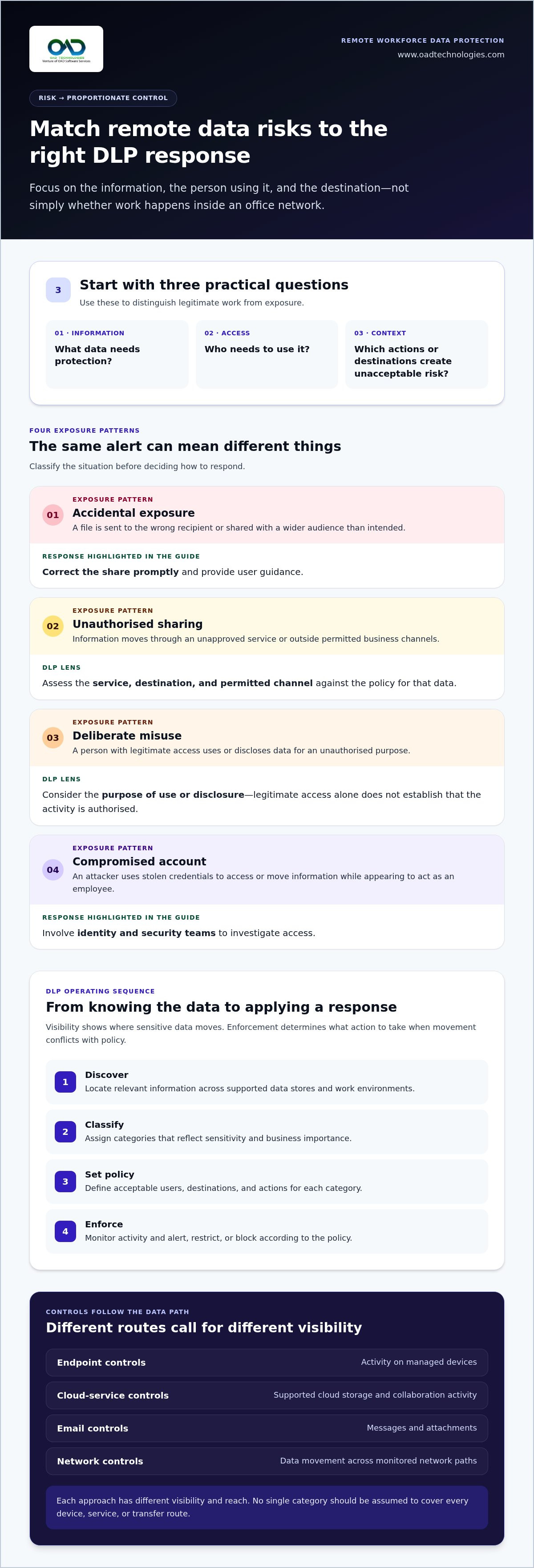
Classify each scenario before deciding on a response:
- Accidental exposure: A staff member sends a file to the wrong recipient or shares it with a wider audience than intended.
- Unauthorised sharing: Someone transfers information through an unapproved service or outside permitted business channels.
- Deliberate misuse: A person with legitimate access uses or discloses data for an unauthorised purpose.
- Compromised account: An attacker uses stolen credentials to access or move information while appearing to act as an employee.
These situations can produce similar alerts, but they call for different investigation and response. A mistaken share may need prompt correction and user guidance. Suspicious activity from a compromised account may require identity and security teams to investigate access.
Why perimeter-based assumptions no longer explain data exposure
A network boundary describes a connection, not the sensitivity of the information being handled. An authorised employee can access a cloud service from home, while an attacker using a compromised account may appear to connect through a familiar route. Remote work alone doesn't make an organisation insecure. Risk depends on the data, the user’s permissions, the destination and the circumstances of access.
For this reason, policy should follow information and identity across work contexts. Leaders can prioritise controls by asking three practical questions: what data needs protection, who needs to use it, and which actions or destinations create unacceptable risk? This helps teams distinguish legitimate work from exposure without relying on blanket restrictions. It also gives security, IT and business owners a shared basis for reviewing exceptions and adapting controls as workflows change.
How DLP protects information across remote work environments
DLP works through a sequence of related functions, not a single alert or blocking rule. Discovery identifies where sensitive information resides. Classification assigns meaning and priority to that information, such as distinguishing a public document from a confidential customer record. Policies define permitted use and sharing, while enforcement applies those decisions at relevant points in a workflow.
Visibility shows where sensitive data moves; enforcement determines what action to take when that movement conflicts with policy. The response depends on the rule and its configuration. A detection may generate an alert for review, restrict an action or block it. For example, a policy might alert when a sensitive file is shared externally, while blocking a transfer to a prohibited destination.
- Discover: Locate relevant information across supported data stores and work environments.
- Classify: Apply categories that reflect sensitivity and business importance.
- Set policy: Define acceptable users, destinations and actions for each category.
- Enforce: Monitor activity and alert, restrict or block according to the policy.
Control location matters. Endpoint controls can monitor activity on managed devices. Cloud-service controls can apply policies to supported cloud storage and collaboration activity. Email controls focus on messages and attachments, while network controls examine data movement across monitored network paths. Each approach has different visibility and reach. No single category should be assumed to cover every device, service or transfer route.
How endpoint and cloud controls address different data paths
On a managed laptop, endpoint controls may help apply rules to local actions such as copying a file to removable media or moving it into an application. Cloud controls focus on information stored or shared within supported services, such as a document set to allow external access. Coverage depends on architecture, configuration and organisational requirements, so map each control to the data path it is intended to address.
The same information can pass through several control points. An employee might download a document to a device, edit it locally and upload it to a collaboration service. Endpoint and cloud controls may each show part of that sequence, while email and network controls address other routes. Design policies with these distinctions in mind rather than assuming one detection point provides complete coverage.
How identity and security operations support DLP
DLP decisions are more useful when they reflect who is acting and what that person needs to do. Role-based access and least privilege help limit access to appropriate information and functions. Identity controls provide context for access decisions, while DLP policies govern permitted handling and sharing. Organisations developing this foundation can explore an identity and access management framework.
SIEM can bring relevant security events together for analysis, and MDR can support security monitoring and response. These capabilities can add operational context to a DLP alert, such as related account or endpoint activity, but they don't replace DLP policies that identify and govern sensitive-data movement. Define who reviews alerts, who approves policy changes and how exceptions are handled. OAD Technologies provides DLP alongside broader cybersecurity services, including SIEM, MDR and identity governance, to support an organisation’s wider security approach.
Comparing remote DLP approaches: coverage, privacy and workflow
No single control point sees every data path. The right mix depends on where sensitive information is used, which services staff rely on and how much operational oversight the organisation can sustain. This comparison turns dlp for remote workforce challenges into practical choices, rather than treating every endpoint, application or transfer as equally risky.
| Control location | Typical visibility and policy reach | Operational effort | Potential workflow disruption |
|---|---|---|---|
| Endpoint | Activity on covered devices, including local copying or transfers to removable media. | Requires device coverage, policy tuning and attention to different device contexts. | Blocks or prompts can interrupt legitimate tasks if rules are too broad. |
| Cloud | Sharing and storage activity within supported cloud services. | Depends on service coverage, configuration and clear policy ownership. | Restrictions on sharing or access can affect collaboration if business workflows aren't mapped. |
| Messages and attachments moving through monitored email channels. | Rules need to reflect sensitivity, recipients and common business correspondence. | Alerts or holds can delay valid communications, particularly when exceptions lack a review path. | |
| Network | Data movement across monitored network paths. | Coverage depends on network design and where traffic can be observed. | Broad controls may affect legitimate transfers; direct access to services may follow different paths. |
These are distinct control locations, not interchangeable product labels. An organisation might prioritise endpoint controls for managed-device handling and cloud controls for approved collaboration, while email rules address sensitive attachments sent in messages. Network controls can add visibility to monitored traffic, but shouldn't be assumed to cover every remote connection or service. Define the intended coverage and policy action for each relevant data path.
Which DLP control point fits each remote-work scenario?
Match the control to the activity: endpoint for local handling on managed devices, cloud for sharing and storage in approved services, and email for sensitive information sent in messages or attachments. Network controls may suit monitored transfer routes. Test policies against ordinary tasks, such as sharing a project file with an authorised external partner, so safeguards don't block work the organisation intends to permit.
How to balance data protection with employee privacy
Set a clear purpose for monitoring: protecting defined information and investigating relevant security events. Explain what activity is monitored, who can access records and how review is governed. DLP doesn't require screen capture or productivity tracking. Limit access to alerts and audit data proportionately, and document who can approve an exception, why it is needed and when it should be reviewed.
False positives need the same discipline as policy exceptions. A repeated alert may indicate a rule that doesn't reflect a legitimate workflow, but ignoring it can obscure genuine risk. Assign an owner to assess the context, record the decision and adjust the rule or exception where appropriate. Regular review helps keep controls relevant as services and work practices change, without treating every alert as misconduct or every request as a reason to weaken policy.
How to plan remote workforce DLP without disrupting work
A workable DLP programme starts with business priorities, not a blanket rule to block every transfer. Teams need to understand which information matters, how staff use it and what actions are proportionate when a policy is triggered. Treat dlp for remote workforce challenges as an ongoing governance process: define the rules, test them against real tasks and refine them as work changes.
Build policies around data, users and work scenarios
Bring security, IT and relevant business owners together to identify priority information, accountable owners and approved uses. Map how different roles access, store, share and transfer that data across remote work scenarios. For instance, a finance team may need to share a restricted report with an authorised colleague, while a public link to the same file would be inappropriate. Translate these distinctions into policies employees can follow.
- 1. Map priority data. Identify important categories, where they are held and who owns decisions about their use.
- 2. Document real workflows. Trace how staff access, share, store and transfer information using managed devices, cloud services, email and other approved channels.
- 3. Define permitted use. Record which roles need access and the business purposes that justify it. Avoid granting broad access simply because someone works remotely.
- 4. Set proportionate actions. Decide when a policy should detect and log activity, prompt a user, restrict an action or escalate it for review. Match the response to the data’s sensitivity and the scenario.
- 5. Pilot and refine. Test proposed controls with representative workflows before wider enforcement. Review whether legitimate tasks are interrupted, whether alerts provide useful context and whether exceptions are being requested for recurring business needs.
A pilot is more than a technical check. Ask staff and process owners where a control slowed an authorised task and what context the policy missed. Use that feedback to adjust the rule, clarify guidance or create a governed exception. Record the decision and assign an owner to review it.
Measure, communicate and refine the programme
DLP effectiveness depends on policy quality and regular review, not simply on the volume of alerts a system generates. Before enforcement changes, explain clearly what the policy protects, what actions may trigger a prompt or restriction, and how employees can raise a legitimate work need. Clear communication helps staff understand the purpose of controls and gives programme owners practical feedback.
- Track whether alerts are relevant and provide enough context for review.
- Review exception requests for repeated workflow patterns or unclear rules.
- Assess reported disruption to legitimate tasks alongside policy outcomes.
- Revisit rules when roles, services or remote-work practices change.
Assign named owners for policy approval, alert review and exception decisions so issues have a clear route to resolution. OAD Technologies provides data loss prevention to help organisations shape controls around their information and operating model. Discuss your DLP requirements.
How OAD Technologies can support a remote DLP programme
A remote DLP programme needs to reflect how an organisation handles information, who is responsible for decisions and how security teams manage relevant events. OAD Technologies provides data loss prevention as part of its enterprise cybersecurity services, helping organisations consider DLP in the context of their wider security environment rather than as an isolated control. The approach can be shaped around the organisation’s data priorities and ways of working.
Connect DLP considerations to the wider security environment
DLP policies address sensitive-data handling, while other security capabilities contribute different kinds of context. Endpoint protection can help teams understand device-related security activity. Identity governance informs who should have access to information and under what conditions. SIEM can support the analysis of security events, while MDR focuses on managed detection and response. These roles can complement DLP, with their contribution shaped by the organisation’s design and operating procedures.
Do not assume that tools automatically share information, trigger actions across systems or fulfil a regulatory obligation simply because they are deployed together. Define the intended responsibilities, information flows and decision owners. For example, establish who reviews a DLP alert, who investigates related identity or endpoint activity, and who can approve a policy exception. Organisations seeking more detail on response operations can explore OAD Technologies’ managed detection and response guide.
This organisation-wide view helps leaders frame dlp for remote workforce challenges within broader governance and security operations. DLP can help manage the movement of sensitive information; identity, endpoint and security operations capabilities address related risks from their own perspectives. Clear ownership helps keep those responsibilities aligned without treating any one capability as a complete security programme.
Discuss requirements and define a suitable next step
A useful first conversation starts with the organisation’s needs, not assumptions about a standard configuration. Leaders can outline the priority information they want to protect, how employees work across office, home and mobile contexts, the services and devices involved, and the controls already in place. It also helps to identify current policy owners, alert-review responsibilities and workflows where restrictions could affect legitimate work.
That context can inform how DLP fits within OAD Technologies’ broader cybersecurity support. OAD Technologies provides Managed Technology Services, and a Fully Managed, Defined Scope arrangement can suit organisations seeking a clearly bounded service scope. The scope should reflect priorities and responsibilities, without assuming a particular outcome or automatic integration with existing controls.
To discuss your organisation’s priorities and possible next steps with OAD Technologies, Book a meeting or Discuss your requirements.
Turn your DLP priorities into a practical next step
Choose one meaningful data-handling scenario and make its intended outcome clear. Decide who owns the information, what legitimate use looks like and how the organisation should respond when activity falls outside that pattern. This gives your team a concrete starting point for dlp for remote workforce challenges, without trying to solve every risk at once.
Keep the programme adaptable. As roles, services and working practices evolve, revisit the assumptions behind each policy and give employees a clear way to raise workflow concerns. A measured review can help leaders distinguish controls that protect information from restrictions that simply add friction. The goal is a sustainable approach that supports responsible work as the organisation changes.
OAD Technologies can discuss your priorities and help you consider a suitable path for your organisation. Discuss your requirements, and take the next step towards a DLP programme shaped around how your people work.
Frequently Asked Questions
Can DLP protect data when employees work from personal devices?
It can, depending on the device, applications and controls the organisation can manage. Some approaches focus on access through supported cloud services rather than inspecting every action on a personal device. For example, a company might limit access to sensitive files from an unmanaged device or apply sharing rules within a business application. Set clear boundaries for personal and work data, and assess privacy implications before choosing controls.
Does remote workforce DLP require employees to use a VPN?
No, DLP does not automatically require a VPN. A VPN can provide a protected route to certain corporate resources, but it does not itself determine whether a file can be shared or sent to an unauthorised recipient. The right approach depends on where information is accessed and which security controls apply. Map the required data paths first, then decide whether network access controls, cloud policies or other measures are appropriate.
Does DLP monitor everything remote employees do?
No. DLP should be configured around defined data-protection purposes, such as identifying attempts to send restricted files through a particular channel. It isn't a general-purpose record of every employee action or a substitute for productivity monitoring. Organisations should set out what activity is collected, who can review it and how records are governed. Limiting monitoring to relevant security events helps align oversight with the organisation’s stated purpose.
What happens when DLP blocks legitimate work?
A blocked action should have a clear route for review, not become an unexplained dead end. The employee can report the business task and information involved so the policy owner can assess whether the rule is too broad or the action needs approval. For example, a valid external file transfer may need an authorised exception. Record the decision, adjust the policy where justified and check whether similar work is affected.
Can DLP protect information stored in cloud collaboration services?
Yes, DLP can help protect cloud-stored information when the relevant service and data activity are within the controls’ supported coverage. Policies may address actions such as sharing a document outside the organisation or making a file broadly accessible. Before relying on this protection, identify which services hold business information, how sharing permissions work and what activity the selected approach can observe. Coverage varies by architecture and configuration.
Does implementing DLP automatically make a company compliant with UAE data-protection requirements?
No. DLP can support an organisation’s data-protection controls, but deploying it does not by itself establish compliance with UAE requirements. Federal Decree-Law No. 45 of 2021 on the Protection of Personal Data (PDPL) is relevant to personal-data processing, but applicability and compliance depend on the organisation’s circumstances and wider practices. Treat DLP as one part of a broader assessment, with appropriate legal and compliance review.
How should an organisation begin assessing DLP for remote work?
Begin by selecting a priority information type and tracing how a specific team uses it, from access through sharing and storage. Note the devices, business services and transfer routes involved, along with existing access and security controls. Then identify an owner for the data and agree what should happen if handling falls outside approved use. This focused assessment gives leaders a practical basis for deciding where DLP could add value.
Disclaimer
Content by OAD Technologies is for general informational purposes only and does not constitute professional or cybersecurity advice. No warranties are made regarding accuracy or completeness; reliance is at your own risk. OAD Technologies shall not be liable for any direct or indirect losses arising from use of this content.