

What if an EDR agent that appears offline signals a wider visibility gap, rather than simply needing a restart? Troubleshooting common edr agent issues starts with identifying what has failed: check-ins, telemetry, policy updates, installation or endpoint performance. Making changes before classifying the problem can disrupt protection or remove evidence that would help explain it.
When an agent stops reporting or security data looks incomplete, it can be difficult to know whether endpoints remain visible. Disabling controls or reinstalling agents as a first response can obscure the cause instead of resolving it.
This guide sets out a systematic way to assess symptoms, investigate possible causes such as connectivity, compatibility, software conflicts or deployment errors, and restore agent health while preserving evidence and protections. It also explains how recurring faults can point to wider operational challenges, including gaps between endpoint tools and security operations. For organisations across the UAE, reliable endpoint visibility is an important part of an effective security programme. OAD Technologies provides EDR, MDR and managed cybersecurity services that can support a wider discussion about how endpoint protection fits into security operations.
Key Takeaways
- Check agent status, last check-in, recent changes and the number of affected endpoints before making changes.
- Use a consistent diagnostic sequence to distinguish deployment, registration, connectivity, authentication and policy-assignment problems.
- Compare performance, update and telemetry symptoms with evidence from the endpoint and management console to guide the next safe check.
- When troubleshooting common edr agent issues, preserve evidence and remediate narrowly. Disabling or uninstalling an agent should not be a routine first step.
- Repeated faults can indicate a wider deployment, policy, network or monitoring challenge that may benefit from review across EDR and security operations.
What common EDR agent issues look like, and what to check first
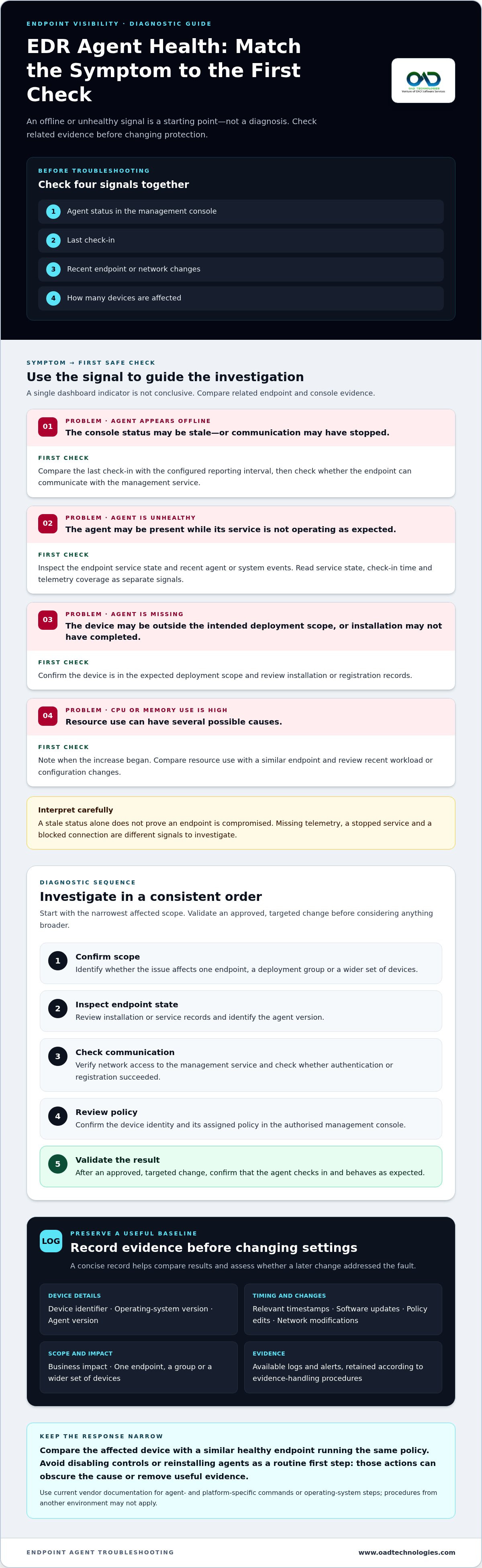
Start with four checks: the agent’s status in the management console, its last check-in, recent endpoint or network changes, and how many devices are affected. An EDR agent is software on an endpoint that collects and sends security telemetry to a management service. For a concise overview of the technology, see What is Endpoint Detection and Response (EDR)?
A symptom is a signal, not a diagnosis. An offline dashboard status might reflect a stopped service, blocked communication or a stale console record. Missing telemetry could indicate a collection or policy issue, while high resource use may have several possible causes. A stale status alone does not prove that an endpoint is compromised. To investigate efficiently, compare the affected device with a similar healthy endpoint running the same policy.
Agent health combines service state, communication with the management service and expected security telemetry. Check these signals together instead of treating a single dashboard indicator as conclusive.
| Symptom | First check |
|---|---|
| Agent appears offline | Compare the last check-in with the configured reporting interval and check whether the endpoint can communicate with the management service. |
| Agent is unhealthy | Inspect the endpoint service state and recent agent or system events. |
| Agent is missing | Confirm that the device is in the expected deployment scope and review installation or registration records. |
| High CPU or memory use | Check when the increase began and compare resource use with a similar endpoint and recent workload or configuration changes. |
How to recognise an EDR agent health problem
Read the dashboard status, endpoint service state, check-in time and telemetry coverage as separate signals. An agent may appear present while its service is stopped, or may have checked in recently while expected events are missing. Compare these indicators on an affected device and a similar healthy device with the same policy. The differences can narrow the investigation without assuming a cause too early.
What to record before troubleshooting
Build a concise record before changing settings. Capture the device identifier, operating-system version, agent version, relevant timestamps and recent changes, such as software updates, policy edits or network modifications. Note the business impact and whether the fault affects one endpoint, a group or a wider set of devices. Preserve available logs and alerts in line with your organisation’s retention and evidence-handling procedures. This baseline makes it easier to compare results and assess whether a later change addressed the fault.
Troubleshoot EDR agent installation, check-in, and policy issues
Follow a consistent sequence before changing settings: confirm the affected scope, inspect endpoint state, check communication, review policy assignment, then validate the result. Start with the narrowest affected scope before changing organisation-wide policies. This helps prevent a single-device fault from prompting unnecessary changes across the estate.
- Confirm scope: Identify whether the issue affects one endpoint, a deployment group or a wider set of devices.
- Inspect endpoint state: Review installation or service records and identify the agent version.
- Check communication: Verify network access to the management service and check whether authentication or registration succeeded.
- Review policy: Confirm the device identity and its assigned policy in the authorised management console.
- Validate: After an approved, targeted change, confirm that the agent checks in and behaves as expected.
Keep commands, file paths and operating-system steps specific to the agent and platform. Use current vendor documentation rather than treating a procedure from another environment as universal.
When an EDR agent will not install or register
Separate a failed deployment from a registration problem. Check whether the operating-system version is supported, installation permissions are sufficient, the approved package is intact and deployment records show the expected result. If installation completes but the device does not appear correctly in the console, investigate registration and device identity instead of automatically repeating the deployment.
Existing endpoint security software or remnants of an earlier agent may also affect installation or service behaviour. Treat these as possible compatibility factors, not established causes. Compare the failed attempt’s logs and deployment details with a successful installation using the same approved package. Differences in permissions, package handling or endpoint state may help explain the failure.
When an agent is offline or receives the wrong policy
Check the endpoint’s network access to the management service, the required destinations approved for your environment, system time and current agent service state. Then confirm that the console shows the correct device identity and assigned policy. An authentication failure, blocked connection and incorrect policy assignment can produce similar symptoms, but each calls for a different corrective action.
Once communication and policy assignment are verified, check whether endpoint events are reaching wider monitoring as intended. The SIEM strategic guide explains how endpoint events may contribute to central security monitoring. For wider context on ongoing administration and tuning, consult EDR Management Strategies and Troubleshooting. Following a consistent sequence makes troubleshooting common edr agent issues more precise and helps preserve visibility during the investigation.
If recurring deployment or monitoring faults raise broader design questions, discuss your endpoint security requirements with OAD Technologies.
Compare EDR performance, update, and telemetry problems
Similar symptoms can have different causes. Workload, endpoint configuration, policy, connectivity and product version may all affect agent behaviour, so compare evidence before changing settings. Use your organisation’s performance baseline and the relevant vendor guidance rather than applying a universal CPU or memory threshold.
| Symptom | Plausible causes | Evidence to inspect | Safe next check |
|---|---|---|---|
| High CPU or memory use | Heavy endpoint workload, a recent application deployment, configuration change or agent update | Resource trends, process activity, change records and comparison with a similar endpoint | Check whether the increase aligns with a change; follow vendor guidance before adjusting policy. |
| Update fails | Connectivity interruption, insufficient system resources, package issue or a change-management constraint | Update status and logs, available resources, network records and approved maintenance records | Confirm the endpoint can reach approved update destinations and retry only through the authorised process. |
| Service is unstable | Software conflict, endpoint changes, version issue or damaged agent components | Service events, agent version, recent updates and application changes | Compare with a healthy endpoint on the same approved configuration; use vendor instructions to guide remediation. |
| Telemetry is incomplete or delayed | Collection or policy issue, connectivity disruption, or delay between endpoint reporting and central ingestion | Local event evidence, endpoint and console timestamps, policy state and communication records | Compare event times at the endpoint and in the console to distinguish delayed ingestion from events that were never collected. |
When the EDR agent affects endpoint performance
Review resource use over time, then compare the affected device with an endpoint running a similar workload and the same policy. Check whether the change began after an agent update, configuration adjustment or application deployment. Avoid broad exclusions as a quick fix: an exception can reduce what the agent observes and should have a documented risk review, approval and defined scope.
When updates fail or expected telemetry is missing
Review update status, available system resources, connectivity and approved maintenance or change records. For missing events, compare local evidence with console timestamps. If events exist locally but appear later in central monitoring, investigate a possible ingestion delay. If they are absent at the endpoint, examine collection and policy state. This distinction helps teams focus on the right part of the monitoring path.
Endpoint visibility supports detection and response beyond the individual device. The MDR strategic guide explains how endpoint signals fit into broader security operations. A structured comparison makes troubleshooting common edr agent issues more evidence-led and helps teams avoid changes that could create coverage gaps.
Apply a safe EDR agent recovery checklist without creating blind spots
Recovery should restore visibility without removing evidence or unnecessarily weakening protection. Before acting, establish what is affected, what changed and what evidence needs to be retained. This keeps troubleshooting common edr agent issues controlled and helps distinguish an isolated endpoint fault from a wider pattern.
- Preserve evidence: Retain relevant logs, alerts and timestamps under your organisation’s evidence-handling procedures.
- Scope the issue: Identify affected devices, business impact and whether similar endpoints show the same symptoms.
- Review approved changes: Check recent updates, policy adjustments, deployments and network changes against change records.
- Remediate narrowly: Use a documented, vendor-approved action that addresses the identified fault without changing unrelated controls.
- Retest and record: Confirm recovery signals and document what changed, what the evidence shows and any remaining risk.
Disabling or uninstalling an agent is not a routine first-line troubleshooting step. Either action can create a visibility gap. If an action would reduce endpoint monitoring, use authorised change control and document risk acceptance, including the scope and duration. Escalate repeat failures, faults across multiple systems, suspected tampering or telemetry gaps that remain unresolved after approved checks.
When to repair, reinstall or escalate
Choose repair or reinstall only after confirming the affected scope, business impact and recovery prerequisites. Follow the vendor’s current approved procedure for the specific agent and operating system. Do not assume that reinstalling is harmless or that steps transfer between platforms. A fault isolated to one endpoint may call for targeted investigation. Similar failures recurring across devices can indicate a deployment, policy or environment-wide pattern that needs broader review. Route suspected tampering or a potential security incident through your organisation’s incident-response process before routine remediation changes the available evidence.
How to confirm the agent has recovered
A completed repair does not prove that protection has been restored. Validate the agent’s service health, successful check-in, expected policy and update status. Then confirm that telemetry has resumed and relevant security events appear in the authorised monitoring view. Compare timestamps to ensure the events reflect activity after remediation, not only older records. Record the likely cause, actions taken, validation evidence and any remaining risk so operational teams have a clear account of the endpoint’s status.
For a broader review of endpoint visibility and security operations, discuss your requirements with OAD Technologies.
When recurring EDR agent issues call for broader security operations support
A single agent failure may be an isolated endpoint fault. Repeated failures across device groups, operating systems, business units or change windows raise a different question: does the environment need a review of its deployment, policies, network dependencies or monitoring design? In that context, troubleshooting common edr agent issues can reveal operational patterns that a one-device fix will not address.
Recognising a wider endpoint operations issue
Look for recurring symptoms and identify who owns each part of the process: agent deployment, policy approval, endpoint visibility and escalation. If teams cannot tell whether missing telemetry reflects an endpoint fault or a monitoring gap, review how endpoint events feed into wider security operations. Security services may support an organisation’s efforts to meet its own requirements, but they do not guarantee compliance.
EDR focuses on endpoint activity and protection. MDR brings managed detection and response capabilities into security operations, while a SOC provides an operational structure for monitoring and coordinating security activity. These capabilities can work together, but their value depends on the organisation’s requirements, responsibilities and integration design. Recurring issues may be a reason to examine those relationships, rather than simply repeat agent repairs.
Discussing a tailored managed security approach
OAD Technologies provides enterprise endpoint protection, EDR, MDR and XDR, alongside managed cybersecurity and SOC services. A discussion can consider how endpoint visibility connects with broader monitoring and response, and where responsibilities sit across internal teams and service scope. Managed Technology Services can be shaped around organisational requirements through a Fully Managed, Defined Scope approach, with clear boundaries rather than an assumption that every recurring fault has the same solution.
Bring a concise picture of the pattern to that discussion: which systems are affected, how often the issue recurs, what changes preceded it, what visibility is missing and how teams currently escalate it. This helps frame the conversation around operational design and continuity, not just the latest agent symptom.
Discuss your requirements with OAD Technologies, or Book a meeting to explore the security operations approach that fits your organisation.
Keep endpoint visibility at the centre of recovery
Effective troubleshooting common edr agent issues starts with diagnosis, not disruption. Check the scope and evidence before changing settings, distinguish endpoint symptoms from possible root causes, and make approved, targeted changes rather than weakening protection as a shortcut.
Recovery also needs validation. Confirm the agent’s service state, check-in, policy and telemetry, then record what changed and any remaining risk. If failures recur across devices or leave monitoring gaps, treat them as a signal to review deployment, policy, connectivity and security operations together.
OAD Technologies provides endpoint protection, EDR, MDR and XDR, alongside managed cybersecurity and SOC services. These capabilities can support a wider discussion about how endpoint visibility connects to your organisation’s security operations, without assuming every environment needs the same approach.
Discuss your endpoint security requirements with OAD Technologies, or Book a meeting to discuss your requirements.
Frequently Asked Questions
Why is my EDR agent showing as offline?
An EDR agent may appear offline because the endpoint cannot reach its management service, the agent service has stopped, or the device is shut down or disconnected. Check the last check-in, endpoint service state and recent network or system changes. A stale console status alone does not prove that the endpoint is compromised. Compare the device’s local state with the management console before deciding on a cause or taking action.
How do I troubleshoot an EDR agent that will not install?
Start by confirming that the operating system is supported and the installation has the required permissions. Check the approved package’s integrity, deployment records and installation logs for errors. If installation appears to complete but the endpoint does not appear correctly in the console, investigate registration separately. Existing endpoint security software or remnants of a previous agent may also affect installation, so compare the failed attempt with a successful deployment using the same package.
Can an EDR agent cause high CPU or memory usage?
Agent activity can contribute to resource use, but the symptom may also reflect endpoint workload, configuration, software conflicts or a recent update. Compare resource trends over time with a similar endpoint running the same policy and a comparable workload. Check whether the change began after an application deployment or configuration change. Do not apply broad exclusions as a quick fix. Assess and approve any exception through a documented risk review.
What should I check when an EDR agent stops reporting telemetry?
Check the agent’s service state, last check-in, assigned policy and communication with its management service. Compare event timestamps in local evidence with those in the central console. If events exist locally but appear later centrally, investigate a possible ingestion delay. If they are absent locally, review collection and policy state. Preserve relevant logs and alerts under your organisation’s evidence-handling procedures, and do not assume that a quiet console means there has been no endpoint activity.
Is it safe to disable an EDR agent during troubleshooting?
Disabling an EDR agent is not a routine first-line troubleshooting step because it can reduce endpoint visibility and protection. Prefer targeted checks and vendor-approved corrective actions that preserve the agent’s controls. If reducing monitoring is necessary, use authorised change control and document the scope, rationale and accepted risk. If you suspect tampering or a security incident, follow your organisation’s incident-response process rather than treating the issue as routine maintenance.
How can I tell whether an EDR issue affects one endpoint or the wider environment?
Compare the affected device with similar healthy endpoints using the same policy, then check for matching symptoms across device groups, operating systems, business units and recent change windows. Review deployment records and endpoint inventory to establish the scope. A fault limited to one device may be isolated. Repeated failures across a shared group or configuration can point to a broader deployment, policy or network issue that needs coordinated investigation.
When should an organisation escalate recurring EDR agent problems?
Escalate when failures recur, affect multiple systems, leave telemetry gaps unresolved or involve suspected tampering. A structured approach to troubleshooting common edr agent issues can help reveal whether deployment, policy ownership, connectivity or monitoring design needs wider review. OAD Technologies provides endpoint protection, EDR, MDR and XDR, alongside managed cybersecurity and SOC services. These capabilities can inform a broader security operations discussion without implying that any one service automatically resolves the underlying issue.
Discuss your requirements with OAD Technologies, or Book a meeting.
Disclaimer
Content by OAD Technologies is for general informational purposes only and does not constitute professional or cybersecurity advice. No warranties are made regarding accuracy or completeness; reliance is at your own risk. OAD Technologies shall not be liable for any direct or indirect losses arising from use of this content.