

What if the biggest risk when migrating from legacy antivirus to EDR is not the new agent, but losing sight of what your existing antivirus still protects? For UAE enterprises, migrating from legacy antivirus to EDR means balancing stronger detection with endpoint coverage, user productivity and a clear view of application dependencies.
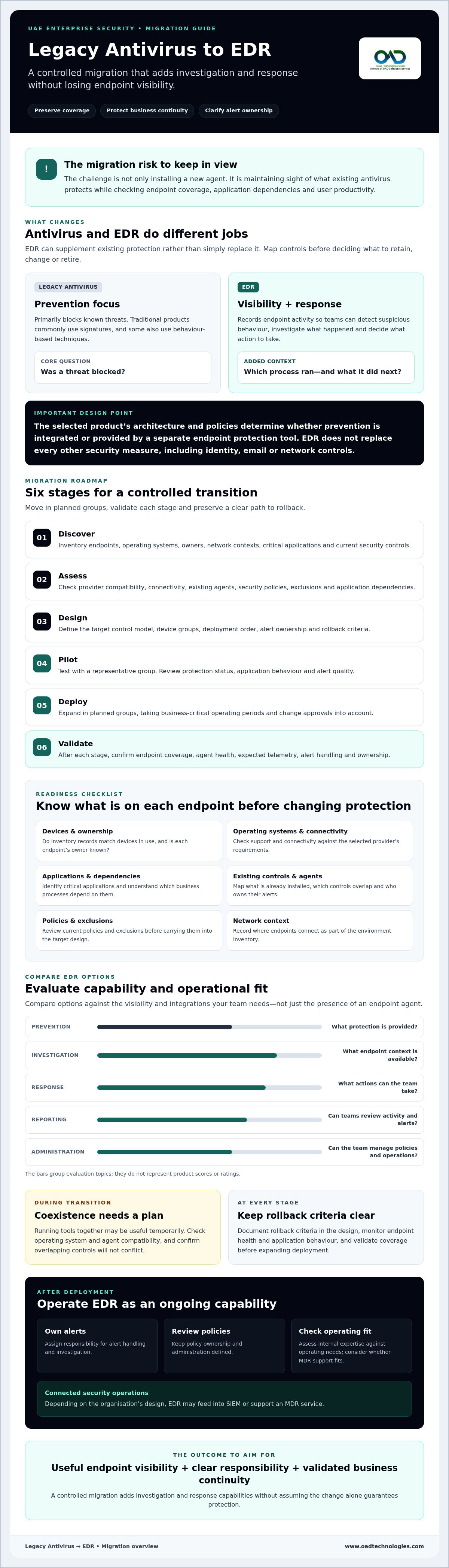
That concern is reasonable. Legacy antivirus and EDR overlap, but they do not do the same job: antivirus primarily blocks known threats, while EDR monitors endpoint behaviour to help detect, investigate and respond to suspicious activity. EDR may supplement existing protection rather than simply replace it, so a rushed rollout can create coverage gaps or disrupt business-critical applications.
This practical guide explains how to assess your current controls, check endpoint and application readiness, and plan a phased deployment with validation and rollback criteria. You will also learn how to manage exclusions, preserve visibility throughout the transition, and decide whether your team has the expertise to operate EDR internally or would benefit from MDR support. The aim is a controlled migration that adds investigation and response capabilities without compromising business continuity.
Key Takeaways
- EDR adds endpoint activity visibility, investigation and response capabilities, but may supplement rather than replace existing security controls.
- Before migrating from legacy antivirus to EDR, inventory endpoints, operating systems, critical applications, ownership and current controls.
- Compare EDR options by prevention, investigation, response, reporting and administration, including the visibility and integrations your team needs.
- Use a staged deployment with endpoint health checks, alert reviews and documented rollback criteria to manage disruption risk.
- Define who will own alerts, review policies and investigate threats, then assess whether internal expertise or MDR support fits your operating needs.
Why consider migrating from legacy antivirus to EDR, and what changes?
Endpoint Detection and Response (EDR) adds visibility into endpoint activity, investigation and response capabilities to the prevention provided by endpoint security. That changes what security teams can learn when an alert appears: rather than relying only on whether a threat was blocked, they can review recorded activity to investigate what happened and decide what action to take.
An endpoint is a device connected to an organisation’s systems, such as a business laptop or server. Telemetry means activity information collected from that device, while detection identifies activity that may be suspicious. Response is the action taken to contain or address a potential threat. This Endpoint Detection and Response (EDR) overview provides additional background on the technology.
Legacy antivirus and EDR: what is the practical difference?
Traditional antivirus products commonly use signatures, which match files or patterns associated with known threats. Some also use behaviour-based techniques to identify suspicious activity. Capabilities vary, so assess your current product rather than assuming every legacy tool works in the same way.
EDR records endpoint activity to give analysts context for investigation and response. For example, if a business laptop triggers an alert, the team can review related activity, such as which process ran and what it did next. That context can help distinguish a legitimate application from suspicious behaviour and inform an appropriate response.
Does EDR replace antivirus or work alongside it?
Not automatically. Some EDR architectures integrate prevention, while others operate alongside separate endpoint protection. The selected product’s design and policies determine which controls it provides. EDR also does not replace every other security measure, such as identity, email or network controls. Map existing protections before deciding what to retain, change or retire.
Running tools together may be useful temporarily during migration, but coexistence should be planned rather than treated as the default long-term design. Check the provider’s requirements for operating system and agent compatibility, and confirm that overlapping controls will not create conflicts. The intended end state should make clear which tool provides each function and who owns its alerts.
Organisations consider migrating from legacy antivirus to EDR to improve investigation capability, adapt endpoint defences to changing threats and connect endpoint information with wider security operations. EDR may feed into SIEM or support an MDR service, depending on the organisation’s design. The goal is not simply to install another agent. It is to establish useful visibility and clear responsibility without assuming the change alone guarantees protection.
Plan an antivirus-to-EDR migration without losing visibility
A controlled migration starts with a reliable picture of the current environment. Before changing endpoint protection, establish which devices are covered, what they run and who depends on them. This preparation helps preserve visibility, identify compatibility risks and support decisions based on business needs rather than assumptions.
Use a vendor-neutral sequence to guide the work:
- Discover: Build an inventory of endpoints, operating systems, owners, network contexts, critical applications and current security controls.
- Assess: Check provider compatibility, connectivity, existing agents, security policies, exclusions and application dependencies.
- Design: Define the target control model, device groups, deployment order, alert ownership and rollback criteria.
- Pilot: Test with a representative group and review protection status, application behaviour and alert quality.
- Deploy: Expand in planned groups, taking business-critical operating periods and change approvals into account.
- Validate: Confirm endpoint coverage, agent health, expected telemetry, alert handling and ownership after each stage.
What should an endpoint readiness assessment cover?
Start by checking whether inventory records match the devices actually in use, then verify operating system support and endpoint connectivity against the selected provider’s documentation. Record current agents, policies and exclusions, including why each exclusion exists. Map dependencies on critical applications and services, and flag device groups that need distinct testing or change approval, such as specialist or business-critical systems.
Also document who owns each group and when changes could affect operations. An exclusion without a clear owner or business reason creates uncertainty during deployment. Recording its rationale gives teams a basis for review and validation.
How should organisations set migration priorities?
Prioritise groups by business criticality, exposure, likely user impact and the team’s ability to support them. Choose a pilot that represents real operating conditions without placing the most sensitive systems first. Before expanding, agree acceptance criteria: expected coverage, acceptable application behaviour, how alerts will be reviewed and who approves progression or rollback.
Consider alert ownership early. Decide which internal roles investigate and act, and what happens when an alert needs escalation. Organisations assessing external operational support can use this Managed Detection and Response strategic guide to frame the discussion. Migration guidance such as EDR deployment best practices can also inform pilot planning and staged policy decisions.
For teams planning an EDR migration, this sequence turns a broad technology change into reviewable decisions. Organisations can also discuss enterprise EDR requirements with OAD Technologies.
How to compare EDR options for a legacy antivirus replacement
Compare EDR options against the work your security team needs to perform, not just a feature list. A useful evaluation looks at prevention, investigation, response, reporting and administration, then checks how each option fits your endpoint estate and operating model. When migrating from legacy antivirus to EDR, this framework can show whether a product adds practical visibility or simply changes the agent on each device.
| Area | Questions to ask |
|---|---|
| Prevention | Which preventive controls are included, and how do they interact with existing endpoint protection? |
| Investigation | Can analysts review relevant endpoint activity, alert context and available evidence? |
| Response | What actions can authorised users take, and how are permissions and approvals managed? |
| Reporting | Can reports show endpoint coverage, alert status and investigation outcomes in a format useful to technical and executive teams? |
| Administration | Can policies, roles and device groups be managed in a way that fits internal governance? |
Which EDR capabilities matter most to enterprise buyers?
Assess how clearly the platform presents endpoint activity and connects it to an alert. Check what evidence is retained, for how long and who can access it. Ask how administrators set policies, assign roles and produce reports for internal review. Confirm agent and operating system compatibility, feature limitations and evidence-handling details directly with the provider before procurement. Validate requirements against your own use cases and governance needs.
Also test the operational fit. A product may offer response controls, but your procedures should specify who can use them, what approval is needed and how actions are recorded. Compare the work required to triage alerts with the security capacity you actually have. A strong technical fit still needs clear ownership.
How should EDR fit with SIEM and MDR?
EDR focuses on endpoint activity. A Security Information and Event Management (SIEM) system can collect and correlate events from multiple sources, helping analysts view endpoint alerts alongside other relevant security data. Confirm which events can be shared, what context is retained and how the connection will be configured. The SIEM strategic guide offers further context on event collection and correlation. Integration depends on the selected systems and should be tested, not assumed.
Managed Detection and Response (MDR) is an operating model that may provide support for detection and response activities. Compare internal ownership, managed support and a defined combination by clarifying who reviews alerts, investigates incidents and communicates decisions. The right arrangement depends on your team’s capacity, escalation process and risk appetite. OAD Technologies provides EDR, SIEM and MDR, which can be considered as part of a broader enterprise security discussion.
How to reduce disruption during EDR deployment and validation
A controlled rollout can reduce avoidable risk, but no deployment plan can guarantee zero disruption. Treat the change as a sequence of approved steps, with checks at each stage and clear criteria for pausing or rolling back. For multi-site organisations, teams may need to coordinate change windows, local IT contacts and user communications across different operating environments.
Begin with a representative pilot, then expand deployment in manageable groups. At each stage, check that the EDR agent is active, endpoints are reporting, expected alerts are visible and critical applications behave as intended. Review alert volume and quality with the people who will investigate them. If a rollout causes unexpected application issues, coverage gaps or unmanageable alert noise, pause expansion and follow the documented escalation or rollback plan.
What can go wrong when antivirus and EDR overlap?
During coexistence, test for resource contention, duplicate alerts and conflicting policies. Two agents may compete for endpoint resources, or overlapping controls may block legitimate activity or produce alerts that obscure useful signals. These are risks to assess, not inevitable outcomes. Follow the selected provider’s compatibility guidance before running agents together, and test with representative devices and applications.
Document each exception, including its business reason, approval and review owner. Avoid broad, permanent exclusions simply to make a pilot appear successful. Investigate the cause and agree on an appropriate resolution.
What should teams verify before retiring legacy antivirus?
Do not remove existing controls based only on a successful installation. First confirm that the intended EDR agent is active and reporting on all in-scope endpoints, including devices that were offline or missed during deployment. Review the detection and response workflow with named operational owners so alerts will not arrive without someone responsible for triage and action.
Keep records of acceptance checks, unresolved issues, approved exceptions and decisions to proceed. Set rollback criteria in advance, such as a defined coverage gap, application impact or a failure in alert handling. For multi-site deployments, obtain the appropriate change approvals and tell affected users and local support contacts what to expect and how to report issues.
Retire legacy antivirus only when the agreed acceptance criteria are met and remaining exceptions have clear owners. This measured approach helps teams manage an EDR migration without treating installation as proof of readiness. OAD Technologies’ enterprise EDR requirements can be discussed as part of the broader migration plan.
What comes after migration: operating EDR as an enterprise capability
Deployment establishes the platform; ongoing ownership determines whether the organisation can use its alerts and policies consistently. After migrating from legacy antivirus to EDR, treat endpoint protection as an operational capability that needs defined responsibilities, regular review and alignment with existing incident processes.
How can leaders assess their ongoing EDR operating model?
Map responsibility from alert to decision. Clarify who reviews alerts, investigates potential incidents, approves response actions and reports material findings to leadership. Then assess whether the team has the skills and operating coverage to perform those tasks consistently, including during staff absences and periods of competing priorities.
Check that EDR procedures connect with the organisation’s existing incident response process. Policies and escalation paths should make clear what the team can do independently, when it needs approval and how decisions are recorded. Review alert handling and policy settings as the environment changes, rather than treating the initial configuration as permanent.
- Internal operation: Consider this where named staff have the capacity and expertise to investigate alerts and coordinate response.
- Managed support: Consider this if alert ownership, investigation capacity or integration responsibilities remain unresolved.
- Combined approach: Define which activities stay with internal teams and which are supported externally, including escalation and decision authority.
Before selecting a managed arrangement, document its scope, responsibilities, communication expectations and relationship to internal incident processes. A clear division of work helps prevent alerts from falling between teams. The operating model should reflect the organisation’s needs, rather than assuming one delivery structure suits every enterprise.
When should an organisation discuss managed EDR support?
Consider external support if your team cannot consistently review alerts, investigate endpoint activity or coordinate response with existing security operations. Also examine whether endpoint findings need to fit into wider monitoring, such as SIEM, and who will maintain that operational connection.
OAD Technologies provides enterprise endpoint protection, EDR, MDR, SIEM and managed cybersecurity and SOC services. Organisations considering a managed approach can discuss how Managed Technology Services and a Fully Managed, Defined Scope model may fit their requirements. Confirm the proposed scope, responsibilities and operating arrangements before making a decision.
EDR is most useful as part of a considered security operation, with people accountable for reviewing signals and acting through agreed processes. The operating model should specify who makes decisions and how escalations are handled.
Make your EDR investment work beyond deployment
Migrating from legacy antivirus to EDR is more than an agent change. A sound approach pairs endpoint visibility and response capability with a controlled rollout, clear validation criteria and named owners for alerts and decisions.
As you plan the next step, keep three priorities in view: map what your existing controls do, test compatibility and application impact before expanding deployment, and choose an operating model your team can sustain. Ongoing policy review and consistent investigation help make EDR part of wider security operations, including SIEM or MDR where appropriate.
OAD Technologies provides enterprise endpoint protection, EDR, MDR and XDR, alongside SIEM and managed cybersecurity and SOC services. These capabilities may be relevant as you assess your requirements and how endpoint detection fits your security operations. Define the scope and responsibilities that suit your organisation.
To explore your options, discuss your requirements with OAD Technologies or book a meeting.
Frequently Asked Questions
What is the difference between legacy antivirus and EDR?
Legacy antivirus primarily aims to prevent or detect known malicious files and behaviours. Endpoint Detection and Response (EDR) adds visibility into endpoint activity, with tools that help teams investigate alerts and respond to suspicious events. The practical distinction is the context available after activity occurs, not simply the product label. Capabilities vary, so compare documented features, including prevention functions and how they interact with your existing endpoint controls.
Can EDR replace traditional antivirus?
Sometimes. An EDR platform may include prevention capabilities that can replace a separate antivirus product, but this depends on the specific product, configuration and endpoint environment. Do not remove existing protection until you have confirmed compatibility, coverage and clear operational ownership. Review the provider’s documentation, then test the intended design in a controlled deployment. Retire legacy controls only when the new arrangement meets your documented requirements.
How do you migrate from antivirus to EDR safely?
Start by building an accurate endpoint inventory and checking operating system support, existing agents, policies and application dependencies. Before migrating from legacy antivirus to EDR, define acceptance criteria and rollback conditions, then test with a representative device group. Check that endpoints report correctly, alerts are useful and named people own investigation and response. Expand deployment in stages, and remove legacy controls only after the new design meets the agreed criteria.
Can antivirus and EDR run at the same time during migration?
They may coexist temporarily, but not every product combination supports this safely. Multiple agents or overlapping policies can create resource contention, conflicting controls or duplicate alerts. Check compatibility guidance from the relevant providers and test the proposed configuration before broad deployment. Record any exceptions, why they are needed and who will review them. Treat coexistence as a planned migration state, not an assumption about the long-term design.
How long does it take to migrate from antivirus to EDR?
There is no reliable universal duration. The effort depends on endpoint numbers and diversity, device readiness, application dependencies, approval processes and the chosen deployment design. An inventory and readiness assessment can help expose constraints, while a pilot gives teams a clearer view of practical requirements. Avoid committing to a timeline before reviewing the estate and agreeing the scope, validation approach and resources needed for deployment.
Does moving to EDR automatically make an organisation compliant?
No. EDR is a security capability, not an automatic compliance outcome. Its contribution depends on how it is configured and operated, how responsibilities are governed and which requirements apply to the organisation. Treat EDR as one part of a wider control environment, and verify regulatory interpretations with authoritative sources and qualified advisers. A product or deployment alone should not be presented as proof that an organisation meets its obligations.
Disclaimer
Content by OAD Technologies is for general informational purposes only and does not constitute professional or cybersecurity advice. No warranties are made regarding accuracy or completeness; reliance is at your own risk. OAD Technologies shall not be liable for any direct or indirect losses arising from use of this content.