

The safest cloud security choice may be to add fewer tools, not more. When comparing native cloud security tools vs third-party platforms, the right answer is not automatically the cloud provider’s built-in controls or a separate multi-cloud suite. It depends on what your current environment can see, where it leaves gaps and who will act on the findings.
If you’re weighing overlapping features against fragmented visibility and extra operational work, those concerns are well founded. Native tools can fit closely with a provider’s environment, while independent platforms may offer a more consistent view across providers. Neither approach is complete by default.
This guide compares their practical strengths and trade-offs so you can assess options against your organisation’s needs. We’ll look at coverage, integrations, visibility and operational fit, including how a single-cloud or multi-cloud estate and applicable UAE requirements may affect your criteria. The aim is to help you identify verified gaps and choose an approach that fits your wider security architecture.
Key Takeaways
- Neither native nor third-party tools suit every organisation. Choose according to your cloud estate, security priorities and operating model.
- Compare native cloud security tools vs third-party platforms across coverage, integration, visibility, administration and operational effort.
- Use a shared requirements matrix to separate essential controls from useful extras, and record evidence for each shortlisted option.
- Follow a structured evaluation, from defining requirements to reviewing a pilot. Document dependencies, ownership and remaining gaps.
- Use verified findings to shape a native, third-party or combined approach. Assess applicable UAE obligations separately from tool selection.
Native cloud security tools vs third-party: what is the difference?
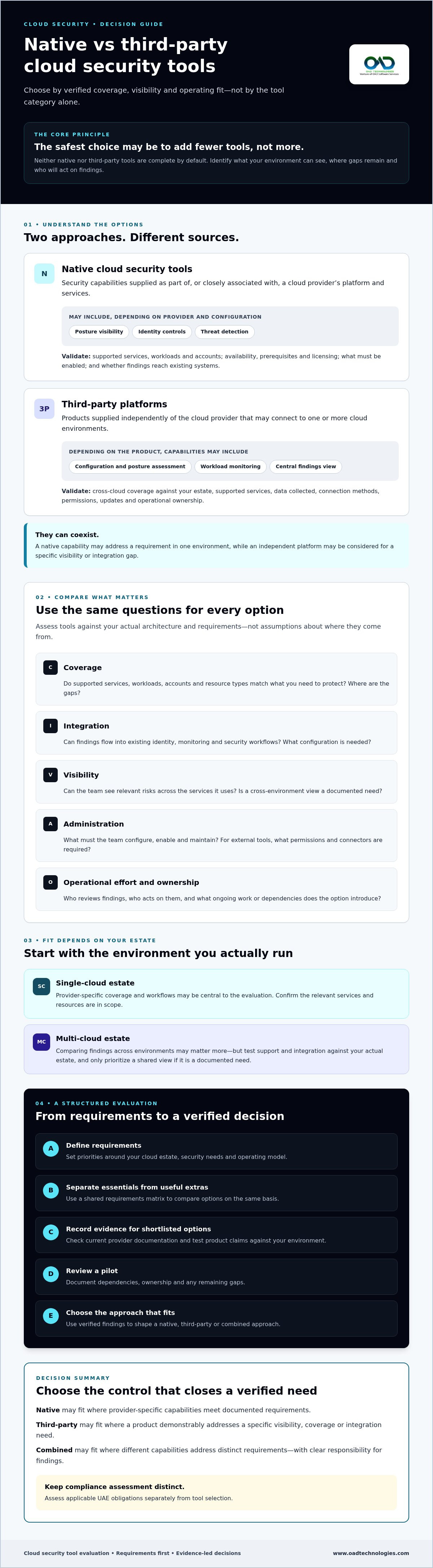
Neither approach is universally preferable. The right fit depends on which cloud environments you use, what you need to protect and how your security team will manage alerts and findings. Comparing native cloud security tools vs third-party platforms means assessing where capabilities come from and how they fit your operating model. It does not establish that either category provides complete protection.
Cloud security covers the policies, technologies and practices used to protect cloud-based systems and data. The Cloud computing security overview offers useful context. When selecting tools, focus on the controls and workloads in scope, not the category label alone.
What counts as a native cloud security tool?
A native tool is a security capability supplied as part of, or closely associated with, a cloud provider’s platform and services. Depending on the provider and configuration, examples may include posture visibility that highlights settings to review, identity controls that help manage permissions, or threat detection that surfaces suspicious activity in supported services.
Native capabilities can be relevant when your estate is concentrated in one provider’s environment. However, don’t assume every service, workload or account is covered by default. Check current provider documentation for scope, supported resources, availability, prerequisites and licensing. Confirm what must be enabled or configured, and whether findings can reach the systems your team already uses.
What counts as a third-party cloud security tool?
A third-party tool is supplied independently of the cloud provider and may connect to one or more cloud environments. Depending on the product, it might assess configuration and posture, monitor workloads or bring security findings into a central view. This may help if your organisation needs to compare information across environments, but test cross-cloud coverage and integration against your actual estate.
Third-party products do not all offer the same capabilities. They may differ in supported services, data collected, connection methods and security functions. Some focus on a specific requirement, while others combine several capabilities. Ask how each shortlisted option handles permissions, data access, updates and operational ownership. Identify dependencies before treating a capability as available to your team.
In practice, native and third-party tools may coexist. A native capability could address a requirement in one environment, while an independent platform may be considered for a specific visibility or integration gap. The useful question is not simply “built-in or external?” Ask whether each option meets a documented requirement, fits your wider security architecture and assigns clear responsibility for reviewing and acting on findings.
How native and third-party cloud security tools differ in practice
Compare tools against your actual architecture, not assumptions about where they come from. In a single-cloud estate, provider-specific coverage and workflows may be central to the evaluation. A multi-cloud estate may make it more important to compare findings across environments, but only if that shared view is a documented need. The NIST guidelines on cloud security provide useful context for assessing security and privacy considerations in public cloud use.
Area
Questions to validate for native tools
Questions to validate for third-party tools
Coverage
Do supported services, workloads and accounts match your requirements?
Which cloud environments and resource types are supported, and where are the gaps?
Integration
Can findings flow into your existing identity and monitoring processes?
Do integrations work with your current security workflows, and what configuration is needed?
Visibility
Can your team see the relevant risks across the services it uses?
Does the tool provide a useful cross-environment view, or require separate setup and interpretation?
Administration
What must your team configure, enable and maintain?
What permissions, connectors and ongoing platform administration are required?
Operating effort
Who reviews findings and decides what action to take?
Will centralised findings reduce duplicated work, or add another queue and owner?
Where native tools may fit an organisation’s requirements
Start with documented security and governance requirements, then check whether the provider’s capabilities address them across the services you use. Trace how controls relate to your identity and monitoring architecture. Confirm where findings are reviewed and who owns follow-up. Verify scope, dependencies and commercial terms in current provider documentation. Built-in availability alone does not confirm that a control is enabled or sufficient for your needs.
Where third-party tools may add relevant coverage
Consider an independent platform when cross-environment visibility or a specific capability is a defined requirement. Validate supported integrations and test whether the information is actionable in your existing workflows. Include configuration, administration and ownership in your assessment. A broader view may be useful, but it does not remove the need to verify coverage and operational fit.
Tool fit depends on your cloud estate, required controls and operational ownership. Use those factors to compare native cloud security tools vs third-party options, rather than relying on feature counts or broad product claims. If you’re mapping cloud requirements to your wider security architecture, OAD Technologies’ cloud security services may be a useful starting point for discussion.
Native vs third-party cloud security: assess coverage, integration and operating effort
Feature counts rarely show whether a tool closes a meaningful security gap. Compare shortlisted options against the same requirements matrix, separating essential controls from useful extras. For each requirement, record the evidence, dependencies, control owner and any unresolved issues. This makes the native cloud security tools vs third-party decision traceable to your architecture rather than broad product claims.
For example, if posture visibility is essential, document which environments and resources need assessment, what evidence the tool provides and who reviews its findings. A feature in product material is not proof that it covers your configuration or operating needs. Independent context on native vs. third-party security tools can supplement your evaluation. Validate each capability against current vendor documentation and your own requirements.
Which environments and assets must the tools cover?
Build an inventory before comparing coverage. Include the cloud providers, accounts or subscriptions, business units, workloads, identities and sensitive data relevant to the evaluation. Mark what is in scope and note known gaps or uncertain ownership. If your estate spans providers, test whether consistent coverage is necessary for each one. Don’t assume a tool’s multi-cloud label means equal visibility everywhere.
For CSPM-specific questions about posture assessment and cloud resilience, see OAD Technologies’ cloud security posture management guide.
How will tools fit the existing security architecture?
Map each shortlisted option to the data sources and integrations your organisation already relies on. Check what access the tool needs, how findings are delivered and whether alerts reach the teams responsible for assessment and action. Confirm who configures and maintains integrations, and who resolves gaps. If centralised monitoring is part of the evaluation, OAD Technologies’ SIEM implementation guide offers further context.
Use a simple evidence record for every requirement:
- Requirement: State the control or visibility need and whether it is essential or additional.
- Evidence: Record what was verified through documentation, configuration review or testing.
- Dependencies and access: Note integrations, permissions, data access and prerequisites.
- Ownership and gap: Name the responsible team and capture unresolved limitations or operational work.
This structure helps distinguish a genuine capability gap from a preference for a broader feature set. It also makes administration part of the comparison. Account for configuration, review, maintenance and action on findings before deciding whether the coverage benefits justify the extra operational effort. If your team needs external support handling day-to-day systems oversight, check out Uptime Co. for comprehensive IT network administration and technology consulting.
A practical evaluation checklist for cloud security tools
Turn the initial review into a controlled evaluation. Bring procurement, security, cloud operations and risk stakeholders together so the decision accounts for technical fit, contractual considerations and day-to-day ownership. Compare options against a shared decision record, rather than restarting the requirements discussion or selecting a tool based on a demonstration alone.
Questions to resolve before comparing products
Confirm the evaluation scope, the outcomes the organisation expects the tools to support and which controls are mandatory. Identify conditional or future-facing needs, and agree who will assess findings, manage access and oversee administration. These decisions give reviewers a consistent basis for comparing native cloud security tools vs third-party options, and help prevent teams from applying different success criteria.
Evaluation sequence
- 1. Assign decision roles. Identify who recommends, reviews and approves the choice across procurement, security, cloud operations and risk.
- 2. Agree success criteria. Define what evidence would show that an option meets each mandatory need. Set criteria before a supplier presentation or pilot begins.
- 3. Confirm assessment boundaries. Decide which environments and representative use cases can be included, and obtain approval for the data and access involved.
- 4. Review dependencies. Check required integrations, permissions, data access, contractual terms and prerequisites. Ask the relevant owner to confirm each item.
- 5. Test agreed use cases. Use approved data to assess how findings are surfaced, interpreted and routed. Record results against the agreed criteria, including tests that could not be completed.
- 6. Decide and document. Summarise evidence, limitations, dependencies, accountable owners and unresolved gaps. Record why the selected approach fits the organisation’s priorities and what needs follow-up.
What to validate during a product assessment
Keep tests close to the work teams will actually perform. For example, follow a relevant finding from detection through review and assignment, then ask the responsible team whether the information supports a clear next step. Confirm access requirements and reporting behaviour using current, authoritative product documentation. Don’t treat a proposed capability as verified until the assessment demonstrates it or the supplier’s documentation confirms its scope.
Before closing the review, have each stakeholder confirm their responsibilities. Note any decision that depends on a later technical or contractual check. This creates an auditable basis for the choice and makes remaining uncertainty visible instead of hiding it in a feature comparison.
If you’d like to discuss how cloud security requirements fit your wider security architecture, discuss your requirements with OAD Technologies.
Build a cloud security approach around verified requirements
The evaluation should lead to a proportionate decision, not a target number of tools. If existing provider capabilities meet documented requirements and your team can manage them effectively, a native approach may be sufficient for those needs. If verified gaps remain, assess whether an independent tool addresses them. A combined model may also fit, provided its additional integrations and ownership responsibilities are justified.
Keep tool selection separate from compliance assessment. A security product may help provide visibility or support control implementation, but adopting it does not establish compliance. Map controls, evidence and responsibilities to the obligations that apply to your organisation in the UAE, and seek appropriate compliance advice where needed.
When a combined approach may merit assessment
Consider combining approaches only when your requirements show a clear reason, such as a capability gap across part of your cloud estate. Before adding another tool, assess integration dependencies, administrative effort and how teams will handle overlapping findings. Document which tool or team owns each control, who acts on alerts and how duplicate or conflicting results will be resolved.
Review the design as your cloud environments, risk priorities and organisational responsibilities change. A combination that fits today may need adjustment as the estate evolves. Keep the requirements record current so future reviews can distinguish new needs from features that were outside the original scope.
Discuss cloud security requirements with OAD Technologies
Prepare a concise picture of your cloud estate, evaluation priorities and known gaps before discussing next steps. Note which environments and assets are in scope, which controls are essential, and where integration or ownership questions remain. This helps keep the conversation focused on your operating context rather than assuming one standard toolset fits every organisation.
OAD Technologies provides Cloud and API security and Cloud Security Posture Management (CSPM) among its enterprise security services. Their relevance depends on your requirements and the scope agreed for any discussion. No tool or service should be treated as a guarantee of security or compliance. To explore how these areas relate to your evaluation, discuss your requirements or book a meeting.
The decision between native cloud security tools vs third-party platforms is strongest when it follows verified needs, clear ownership and a realistic view of operational effort. Use those criteria to shape an approach that can evolve with your cloud estate.
Choose the cloud security model your requirements support
The decision between native cloud security tools vs third-party platforms does not need to be all or nothing. Start with verified requirements, compare evidence rather than feature claims, and account for who will integrate, administer and act on each tool. A native, third-party or combined approach may be appropriate when it fits your cloud estate and operating model.
Keep compliance assessment distinct from product selection. Map relevant controls and evidence to the obligations that apply to your organisation, and review the approach as your environment and responsibilities evolve.
OAD Technologies provides Cloud and API security and Cloud Security Posture Management (CSPM) among its enterprise security services, alongside SIEM, IAM and managed cybersecurity services. These areas may inform a requirements-led discussion, depending on the scope your organisation needs.
Discuss your cloud security requirements with OAD Technologies or book a meeting. With clear priorities and ownership, you can shape an approach that supports your organisation as its cloud environment develops.
Frequently Asked Questions
Are native cloud security tools enough for an enterprise?
They may meet some requirements, but only after you verify their coverage and operational fit. Check whether the capabilities address the cloud services, identities and workloads your enterprise uses, and whether your team can configure them and act on findings. If a documented requirement remains unmet, assess other options. Base the decision on evidence, risk priorities and available ownership, not simply on whether a tool is built into the cloud platform.
Can native cloud security tools work across multiple cloud providers?
Some provider-supplied capabilities may offer visibility into connected environments, but don’t assume native tools provide consistent coverage across providers. Support can vary by resource type, service, configuration and licensing. Check current documentation for each tool, then test it against an inventory of your cloud accounts and workloads. Compare the depth and consistency of findings across environments, and identify which team is responsible for gaps or separate provider-specific views.
When should an organisation consider a third-party cloud security tool?
Consider one when your assessment identifies a specific need that existing controls do not adequately address. That could include a requirement to review cloud environments through a shared view or connect findings with existing security workflows. Confirm that the tool supports the assets and integrations you rely on, then weigh any coverage benefit against data access, administration and ownership effort. A third-party platform should close a verified gap, not add features without a clear purpose.
Do third-party cloud security tools replace native cloud controls?
Not necessarily. A third-party tool may complement provider-supplied controls, provide additional functions or bring certain findings together, depending on its verified scope. It does not automatically replace cloud configuration, identity or security controls. Map each requirement to the tool or team responsible for it, and document overlaps, dependencies and uncovered areas. If you plan to remove or reduce an existing control, validate that the alternative meets the requirement before making a change.
How should a business compare native and third-party cloud security tools?
Compare them against the same documented requirements rather than relying on feature counts. For each option, assess supported environments and assets, integrations, required access, reporting, administration and ownership of findings. Record evidence for mandatory controls separately from useful additional features, and note limitations or assumptions. A pilot using representative, approved data can show whether findings reach the right teams and support the organisation’s defined assessment and response processes.
Can using cloud security tools guarantee regulatory compliance?
No. A tool can support security and compliance efforts by helping teams monitor or assess selected controls, but using it does not establish that an organisation complies with applicable obligations. Compliance depends on the organisation’s activities, governance, implementation and evidence, among other factors. Identify the requirements that apply, map them to controls and assign owners for review. Confirm interpretations with authoritative sources or qualified advisers rather than relying on a product’s compliance labels alone.
What should a UAE organisation verify before selecting cloud security tools?
Confirm which UAE requirements apply to your organisation and data, including any relevant federal, free-zone or sector-specific obligations. Verify where the tool stores and processes data, what information it accesses, how integrations work and what contractual terms apply. Check these details against authoritative sources and obtain appropriate advice for your circumstances. Also validate product coverage, permissions, licensing and ongoing ownership so the selection fits both the cloud estate and the organisation’s responsibilities.
Disclaimer
Content by OAD Technologies is for general informational purposes only and does not constitute professional or cybersecurity advice. No warranties are made regarding accuracy or completeness; reliance is at your own risk. OAD Technologies shall not be liable for any direct or indirect losses arising from use of this content.