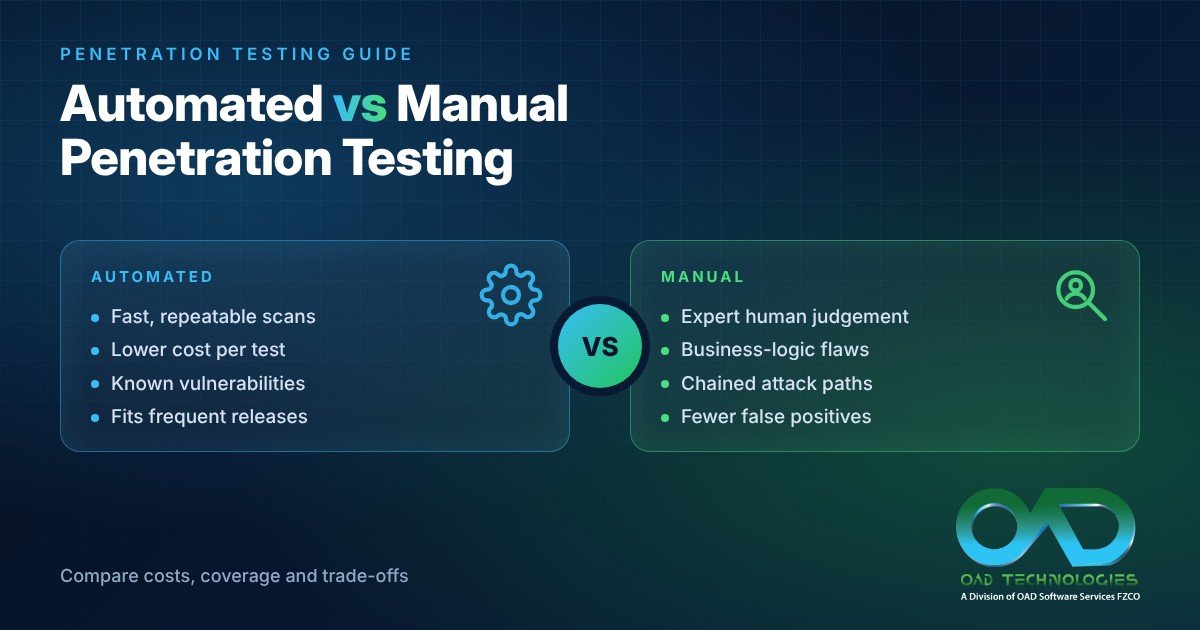
The fastest test is not always the one that finds the most important risk. Automated testing suits frequent, repeatable checks, while manual testing brings human judgement to complex attack paths and business-specific logic. Weighing the pros and cons of automated vs manual penetration testing means understanding what each can reveal, and often combining them.
Automation can be useful when releases are frequent: it repeats checks quickly and helps teams spot familiar weaknesses. But automated results may include false positives or miss issues that depend on context. Manual testing takes longer, yet a tester can investigate how vulnerabilities connect and whether they create a meaningful risk.
This guide compares both approaches across speed, cost drivers, scalability, flexibility and vulnerability discovery. It also outlines how to use automated testing and validate its findings. For example, a UAE organisation that regularly updates a customer portal could run automated checks after code changes, then use manual testing to examine access controls and business logic. The decision guide helps match the approach to your system, release cadence and security priorities.
Key Takeaways
- Use automated checks as part of a controlled testing process, with scope, timing and system impact planned before tests run.
- Assess cost by considering testing frequency, system complexity and the effort required to review and remediate findings, not speed alone.
- Choose the testing mix around your infrastructure and objectives; repeatable checks and deeper investigation answer different security questions.
- Review automated findings manually to distinguish actionable vulnerabilities from false positives and uncover issues that need human judgement.
- Use the decision guide to map your release cadence, risk priorities and testing resources to a practical approach.
What Is Automated Penetration Testing?
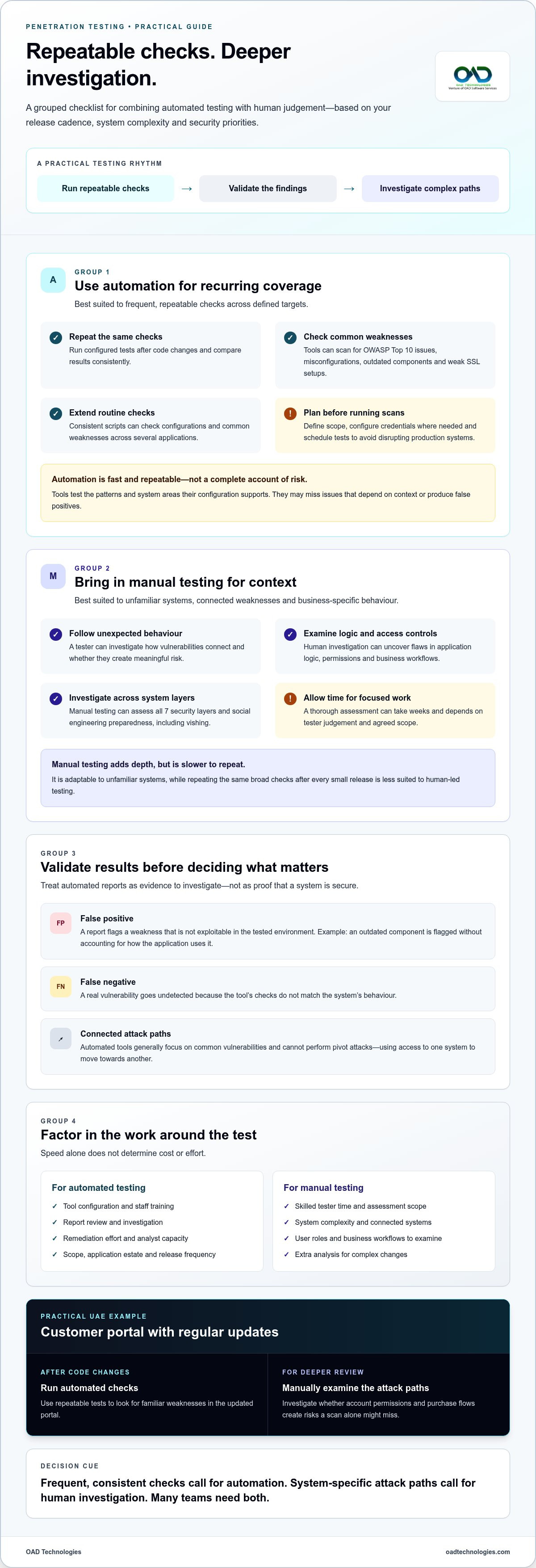
Automated tools scan for recurring weaknesses, including OWASP Top 10 issues, misconfigurations, outdated components and weak SSL setups. Manual testing explores context and connected attack paths; automation is faster and repeatable, but false positives, missed issues and limited context can reduce accuracy.
Automated Testing Benefits and Limitations
Automated penetration testing uses software to run defined checks against selected systems, then produces reports for review. Its strength is consistency: teams can repeat the same checks after code changes and compare results. This makes it useful for routine coverage, but a tool can test only the patterns and system areas its configuration supports.
Results also depend on the tool’s quality and the operator’s expertise. A scanner may identify a known weakness without showing how an attacker could use it, or miss a critical issue its detection logic does not recognise. Security analysts still need to validate findings, assess their relevance and guide remediation.
False Positives and Limited Context
A false positive flags a weakness that is not exploitable in the tested environment. For example, an automated report might flag an outdated component without accounting for how the application uses it. A false negative is the opposite: a real vulnerability goes undetected because the tool’s checks do not match the system’s behaviour.
Automated tools generally focus on common vulnerabilities rather than deeply investigating every system layer. They cannot perform pivot attacks, which involve using access to one system to move towards another. Treat reports as evidence to investigate, not as a complete account of threats or proof that a system is secure.
Manual Testing Benefits and Limitations
Manual penetration testing puts a human tester in control of the investigation. A tester can follow unexpected behaviour, connect separate weaknesses and assess logic or access-control flaws that automated checks may miss. Manual work can also assess all 7 security layers and test social engineering preparedness, including vishing.
That depth takes time and depends on the tester’s judgement and the agreed scope. A thorough manual assessment can take weeks, while an automated scan can repeat checks quickly. Manual testing is more adaptable to unfamiliar systems, but less suited to running the same broad checks after every small release.
For example, an online retailer in the UAE that regularly updates its customer portal could run automated checks after code changes. Manual testing could then examine whether account permissions and purchase flows create attack paths that a scan alone might miss.
| Testing option | Coverage | Accuracy and context | Speed and repeatability | Main limitation |
|---|---|---|---|---|
| Automated | Common, configured patterns | Needs human validation | Fast and repeatable | Can miss context or produce false results |
| Manual | Adaptable investigation across system layers | Can assess connected flaws | Slower to repeat | Requires focused tester time |
Choose based on whether your priority is frequent, consistent checks or a deeper investigation of system-specific attack paths.
Automated testing speed, scalability, and cost-efficiency
Automation can shorten repeat checks, while manual testing uses tester time for investigation. The right fit depends on your release cadence, application scope and available skills.
Automated Testing Speed and Scalability
Automated methods run scripts against defined targets and return results without requiring a tester to repeat every action. For an organisation maintaining several applications, consistent scripts can check the same configurations and common weaknesses across systems. This supports frequent testing, particularly when developers need feedback after a release or a change to shared components.
Speed does not eliminate the need for operational planning. Teams need to define the test scope, configure credentials where needed and schedule scans to avoid disrupting production systems. A large application estate can extend automated coverage, but results still require analyst review. A fast scan that produces untriaged findings may shift the workload rather than reduce it.
Manual testing scales differently. Each assessment requires a tester to understand the target, select attack paths and interpret behaviour. That effort can be valuable for a new application with unusual workflows, but is harder to repeat with every release. Automation handles recurring checks; human assessment focuses on system behaviour that needs investigation.
Testing Costs and Resource Considerations
Testing costs involve more than the time spent running a scan. Account for tool configuration, staff training, report review, investigation and remediation. For example, an application with frequent updates may justify automating repeatable checks, while a complex change may need additional manual analysis to understand its security impact.
Manual testing uses skilled tester time, so scope and complexity affect the effort required. A focused assessment of one application differs from examining connected systems, user roles and business workflows. Automated testing can reduce repeated execution effort, but still requires capable staff to configure tests, assess findings and decide which issues need action.
Compare methods by the work they prevent or reveal, not by execution speed alone. If a scan reports a weak configuration, an analyst must determine whether it affects the organisation’s actual exposure. If a manual assessment uncovers a flaw in a key transaction, its value lies in clarifying the real impact and remediation priority.
- Frequent releases: automate repeatable checks to provide consistent feedback.
- Complex application behaviour: reserve tester time for contextual analysis.
- Limited internal capacity: include configuration, review and remediation effort in resource planning.
Use automation for recurring coverage, then direct manual effort towards changes and workflows with the greatest business impact.
Which testing method should you choose for your project?
Choose a testing approach by considering what your infrastructure needs to prove, how often it changes and what decisions the findings must support. The pros and cons of automated vs manual penetration testing matter most when assessed against a defined scope, not as a general ranking of methods.
Conduct penetration testing at least annually or after significant system changes. In the UAE, first identify the sector requirements relevant to your organisation, such as CBUAE requirements, ADHICS or DESC ISR. These apply in different contexts, so do not assume one testing schedule or evidence format suits every environment.
Map assets and connections before choosing a method. A stable estate with standardised configurations may suit repeatable automated checks. An environment with interconnected applications, varied user permissions or unfamiliar workflows needs more investigation. For example, after a cloud migration, the assessment should consider changed configurations and access paths, not simply count the systems moved.
Infrastructure size alone does not settle the decision. A large estate with consistent technology can be simpler to test repeatedly than a smaller application with sensitive transactions and complex rules. Consider data flows, user roles and the consequences of misuse. These factors help determine whether tools can meet the objective or testers need to investigate system behaviour.
For compliance reviews and audits, identify the requirement and evidence needed before testing begins. A scan report can record checks and detected issues, while a manual assessment can document how testers examined context and validated findings. Neither report type alone establishes compliance. Assess the pros and cons of automated vs manual penetration testing against the audit’s specific purpose and evidence requirements.
- Use automation for recurring checks on established systems and frequent releases.
- Use manual testing for unfamiliar architectures, complex logic or attack paths requiring interpretation.
- Combine methods when repeatable coverage and deeper assessment both support the security posture.
For an organisation in the UAE, a financial environment should consider applicable CBUAE requirements; a healthcare environment should consider ADHICS, while Dubai government environments should consider DESC ISR. The relevant context shapes the scope and evidence, rather than dictating one universal testing method.
Record the decision in the test plan, including assets, method, timing, risk priorities and finding-validation steps. Assign remediation owners and retest important fixes. This creates a traceable process for internal reviews and helps teams adjust coverage as infrastructure and business priorities evolve.
Use system complexity to set testing depth, release frequency to guide repeat checks and applicable UAE sector requirements to shape evidence. This gives your team a clear basis for choosing a method and reviewing it as the environment changes.
Manual testing flexibility and vulnerability discovery
Manual testing lets an assessor adapt techniques as an application reveals unexpected behaviour. It can connect separate vulnerabilities into an exploit path, whereas automated checks follow programmed patterns. Manual penetration testing can uncover logic flaws, access-control weaknesses and blind SQL injection that automated scans may miss.
Automated tools can detect common issues, including OWASP Top 10 vulnerabilities, misconfigurations, outdated components and weak SSL setups. They may miss a weakness when it depends on user intent, application state or interactions between features. A scan identifies patterns; a tester can investigate how a real attack might unfold.
Consider an account portal with separate customer and administrator roles. A manual tester can sign in as a customer, change request values and trace whether the application exposes another user’s records. The result is more than an access-control alert: the tester examines the conditions required, the data affected and the potential impact, then records reproducible evidence.
Business logic vulnerabilities often arise when valid features are used in an unintended sequence. A tester might examine whether a user can repeat a one-time action, bypass an approval step or access a function through an unexpected route. These tests require an understanding of the workflow and expected outcomes; a scanner may recognise valid pages and responses without detecting a flaw in the process.
Manual vulnerability analysis also tests whether separate weaknesses can be chained. A low-impact information leak may reveal a route or identifier that enables a later access-control attack. Testers can use techniques catalogued in the MITRE ATT&CK framework to model real-world behaviour, then explain how each step affects the system and its users.
- Reproduce: Record the request, response and conditions that trigger the issue.
- Validate: Confirm the weakness is real and distinguish it from a false positive.
- Assess: Trace the exploit path and describe the affected function or data.
- Prioritise: Give remediation teams evidence that connects technical severity to business impact.
Validation matters because a vulnerability’s label alone does not establish its risk. Testers should distinguish a theoretical weakness from an exploit that works under the application’s actual permissions and configuration. They should also stay within the agreed scope and document any system behaviour that affects safe execution.
For a thorough cybersecurity assessment, combine scan results with manual investigation of sensitive workflows, role boundaries and unexpected paths. Automated findings can guide the investigation; human analysis determines whether vulnerabilities combine into a meaningful attack and which remediation should come first.
Automated penetration testing process
Effective automation starts with a defined scope, not a scan button. A controlled process helps teams produce useful assessments, limit disruption and turn results into security work.
- Define scope and ownership. List the applications, environments and interfaces included in testing. Name the team responsible for each asset, and record systems that must remain outside scope. For a UAE organisation, a customer portal might include its public application and connected test environment, while excluding unrelated corporate systems.
- Choose scenarios and configure tools. Select checks that match the application’s technologies and likely attack surface. Configure authentication where required, and decide which vulnerability categories the tools should assess. Some tools use threat intelligence feeds to update detection logic with recent CVEs and exploit signatures, helping checks reflect emerging software weaknesses.
- Set timing and safeguards. Schedule assessments around release activity and operational risk. Throttle automated testing to manage how quickly requests run, especially when systems support live users. Test in a representative environment where possible, using production-like data so application behaviour resembles real use without treating the test environment as a substitute for scope controls.
- Run checks regularly and after changes. Integrate suitable tests into CI/CD pipelines, where they can assess changes during the development lifecycle. Regression checks after code updates can reveal whether a known issue has returned or a change introduced a new finding. Keep recurring scans aligned with the defined attack surface as applications and infrastructure evolve.
- Validate and route findings. Review results for accuracy, confirm affected components and assign remediation owners. Automated reports can contain false positives or miss issues, so analysts should investigate high-impact findings rather than treating every alert as confirmed exposure. Integrating results into patch management can create a feedback loop for identifying and addressing outdated software.
People and policy shape the process as much as tools do. Give development, operations and security teams access to the testing workflow so each group can understand relevant findings and act on them. Train security personnel to configure tools, interpret reports and recognise when human review is needed. Document the process in security policies, including scope approval, test scheduling, escalation and remediation tracking.
For a retailer in the UAE preparing a customer portal release, teams could scope the portal and its test environment, run throttled checks through the CI/CD pipeline, then route confirmed outdated-component findings to patch management. The practical lesson is to make automation repeatable, controlled and connected to remediation, rather than treating a generated report as the finished assessment.
OAD Technologies: Data Loss Prevention (DLP)
OAD Technologies provides Vulnerability Assessment and Penetration Testing (VAPT) to assess vulnerabilities and validate security findings. If an assessment also raises concerns about sensitive information leaving the organisation, its Data Loss Prevention (DLP) offering addresses that separate data protection need.
These services address different parts of the security picture: VAPT examines system weaknesses, while DLP focuses on reducing data loss risks. Considering both can help teams connect technical findings with the information they need to protect, rather than treating every issue as a scanner alert.
For a UAE business reviewing a customer-facing application, VAPT can inform remediation priorities, while DLP supports a broader focus on sensitive data. Discuss your requirements with OAD Technologies.
Turn Testing Insight into Ongoing Action
Make the next step operational: assign owners to findings, connect remediation to release decisions and revisit the test scope when systems change. Understanding the pros and cons of automated vs manual penetration testing helps teams make testing a repeatable part of security planning, rather than a one-off exercise.
OAD Technologies offers Vulnerability Assessment and Penetration Testing (VAPT) to assess system weaknesses, alongside Managed Detection and Response (MDR) for security monitoring and response. Its Data Loss Prevention (DLP) offering addresses the separate need to reduce data loss risks. Consider how these services fit your organisation’s priorities and security operations.
Build on your current priorities, then strengthen your approach as your systems and business needs evolve.
Frequently Asked Questions
Which one to choose?
Choose the method that best answers your security question. If you need to check whether a specific release reintroduced a known weakness, automated testing can provide repeatable evidence. If you need to understand whether a user journey exposes sensitive functions, include manual testing. Before choosing, identify the assets, important business actions and decisions the results must support. This keeps the assessment aligned with operational priorities.
What is automated penetration testing and what is manual penetration testing?
Automated penetration testing uses software to run configured security checks, while manual penetration testing relies on a tester to examine a system and its behaviour. For example, a tool can test an application endpoint against known input patterns; a tester can then explore how that endpoint behaves across different account roles. The difference lies in who directs each test and how much interpretation the assessment requires.
What are the pros and cons of manual penetration testing?
Manual testing adapts to unexpected results and can investigate how a weakness affects a real workflow. For example, a tester can follow a user journey from registration through account changes to check whether permissions remain appropriate. Its depth depends on the agreed scope and tester effort. It also requires more coordination than repeating a scripted check, so prioritise the workflows that matter most.
How do automated and manual penetration tests compare in cost and turnaround time?
Automated checks generally return execution results faster, while manual assessments need time for investigation and interpretation. Costs depend on factors such as the number of assets, test scope, tool configuration, specialist effort and the work needed to validate findings. For planning, separate the time spent running tests from the time needed to confirm issues, assign owners and set remediation priorities.
When should organisations use automated, manual, or hybrid penetration testing?
Use automated testing for recurring checks on established applications, manual testing for complex workflows or unfamiliar system changes, and a hybrid approach when both needs apply. For example, a UAE organisation could scan a customer portal after routine releases, then manually assess a redesigned payment journey before launch. Define the scope and objective first, then use each method to answer the relevant question.
Disclaimer
Content by OAD Technologies is for general informational purposes only and does not constitute professional or cybersecurity advice. No warranties are made regarding accuracy or completeness; reliance is at your own risk. OAD Technologies shall not be liable for any direct or indirect losses arising from use of this content.