
Microsoft 365 security in the UAE depends on settings that are actively monitored, not simply switched on. Enable unified audit logging, make sure someone receives and reviews security alerts, and protect administrator accounts with multi-factor authentication. These measures give your business a clearer view of activity and help it respond to emerging risks.
It’s easy to assume that a secure configuration will stay secure without ongoing attention. In practice, policy changes, access permissions and email settings can all affect how well your environment is protected. Microsoft began phased mandatory multi-factor authentication enforcement on admin surfaces in October 2024, making administrator access an important part of any security review.
This guide explains which Microsoft 365 settings matter, how audit logs and alerts support monitoring, and how UAE data protection requirements can shape your approach. It also covers the risks of misconfigured policies and access controls, what security monitoring and administration involve, and why service pricing varies with environment size, user numbers and required controls. You’ll come away with a practical view of the decisions that can help strengthen your organisation’s Microsoft 365 security.
Key Takeaways
- Assign clear ownership for reviewing security alerts and deciding what action follows, so important signals don’t sit unnoticed.
- Relate Microsoft 365 data handling to the UAE rules that apply to your organisation, then identify the controls and records that support compliance.
- Shape a service scope around your environment size, user count and required security controls; these are key factors that influence the cost.
- Keep Global Administrator access limited to two or three named people, and make privileged access part of your regular security review.
- Compare the security capabilities included in each Microsoft 365 plan with the controls your business actually needs before deciding on a licence.
Audit logging and security alerts
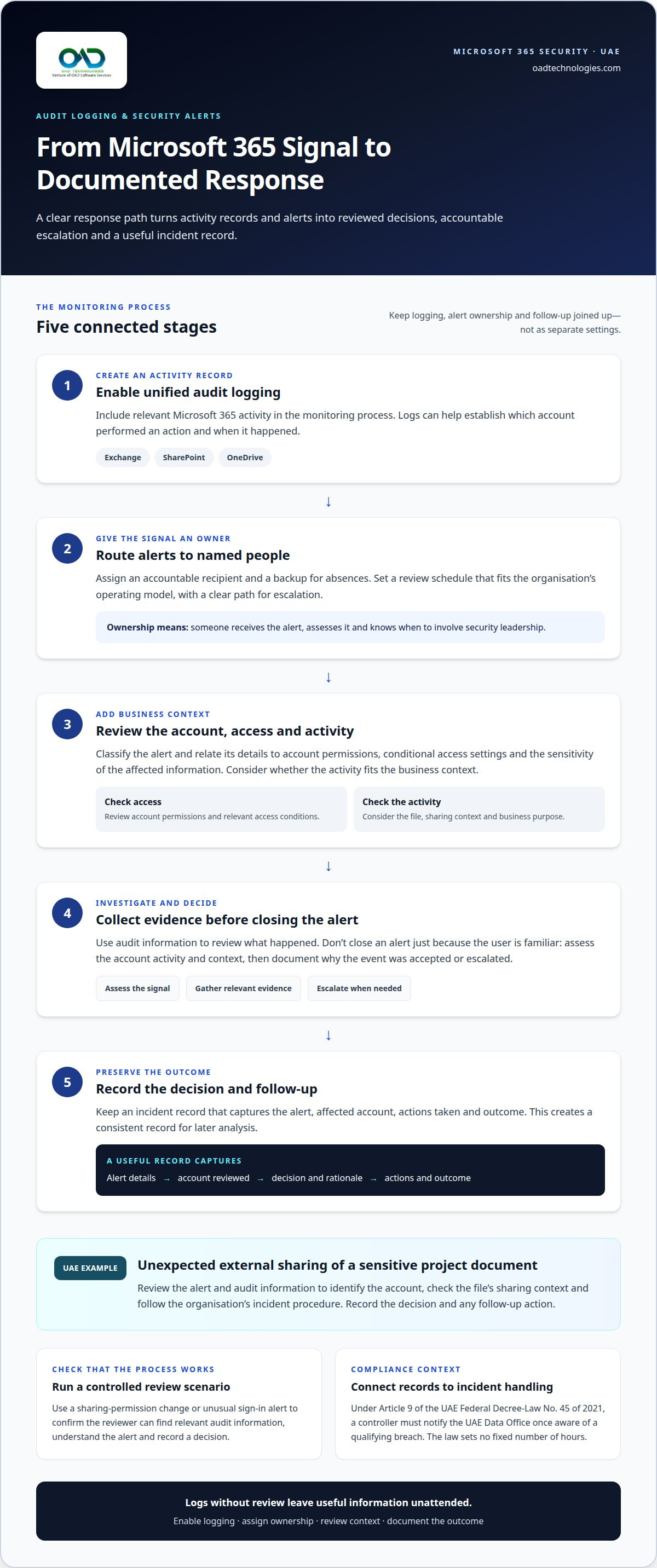
Unified audit logging gives UAE businesses a record of activity across Microsoft 365. Enable it so investigations can use evidence rather than assumptions. Logs can help establish which account performed an action and when it occurred. Security alerts provide a separate signal, highlighting activity that may need review. Logging without a review process leaves useful information unattended.
Assign a named person to receive alerts and a backup contact for absences. Set a review schedule that fits your organisation’s operating model. The reviewer should classify each alert, document the decision and escalate activity that needs investigation. Keep an incident record of the alert, affected account, actions taken and outcome. This creates a consistent record for later analysis.
Include Microsoft 365 services where employees create, store or share sensitive information. SharePoint and OneDrive activity can matter when files move between teams or sharing permissions change. For example, an organisation could investigate an alert involving an unexpected external share of a sensitive project document. The response should identify the account, review the file’s sharing context and follow the organisation’s incident procedure.
- Enable unified audit logging: Include relevant Microsoft 365 activity in the organisation’s monitoring process.
- Route alerts: Assign an accountable recipient and a clear escalation path.
- Review access: Relate alert details to account permissions and conditional access settings.
- Record decisions: Capture the investigation outcome and any follow-up action.
Conditional access settings influence how users reach business resources. Review them alongside alerts rather than treating policy configuration as separate work. If an alert involves an account accessing SharePoint, consider the account’s access conditions and the sensitivity of the relevant files. This context helps distinguish expected business activity from events that need escalation.
Alert handling also requires clear ownership and defined thresholds. A useful procedure states who assesses the signal, what evidence they collect and when they involve security leadership. Don’t close an alert just because the user is familiar. Review account activity and business context, then document why the activity was accepted or escalated.
Test the process with a controlled review scenario, such as a change to sharing permissions or an unusual sign-in alert. Confirm that the assigned reviewer can find relevant audit information, understand the alert and record a decision. The exercise can reveal gaps in access, ownership or escalation before a real incident requires a response.
Compliance and legal risk
The main risks are exposed personal data, excessive access, unsafe sharing and policies that don’t match business needs. Microsoft 365 controls can reduce these risks, but configuration alone doesn’t establish legal compliance.
Federal Decree-Law No. 45 of 2021 on personal data protection has been in force since 2 January 2022, according to UAE Legislation. For a Microsoft 365 environment, connect the organisation’s data protection obligations to the information it stores, who can access it, and how it is used.
Start by mapping personal data to its Microsoft 365 location and business purpose. Include Exchange, SharePoint and OneDrive, along with any connected services. Identify the teams responsible for each data set, the users who can reach it, and the devices used to access it. This structure helps reveal where access, sharing or storage settings need closer review.
The applicable rules can depend on the organisation’s location and sector. DIFC organisations are subject to DIFC Data Protection Law No. 5 of 2020. Federal Law No. 2 of 2019 applies additional obligations to clinics concerning where health data is processed. A clinic in the UAE, for example, should assess health-data processing alongside its Microsoft 365 storage and access arrangements.
- Review access: Identify privileged accounts, user permissions and access granted to external parties.
- Assess devices: Consider how authentication and device management protect access to business data.
- Examine sharing: Review where sensitive files can be shared and which users can change permissions.
- Document decisions: Record the business purpose, responsible team and controls for each data set.
Authentication is one part of a security review, not a substitute for sound permissions. A second authentication factor can help protect an account, while device management can apply controls to devices accessing company information. Together, these measures should support productivity without giving every user unrestricted access to storage.
Incident handling also matters. Under Article 9, a controller must notify the UAE Data Office once it becomes aware of a qualifying breach; the law sets no fixed number of hours. The organisation’s response process should establish who assesses an incident, identifies affected personal data and manages notification duties.
For a practical UAE example, a professional-services firm working with OAD Technologies could map client records in SharePoint, then review external sharing, user permissions and device access. That review helps connect technical settings to the records’ purpose and sensitivity. Microsoft 365 can support those controls, but people, processes and legal responsibilities still need clear ownership.
Keep the review tied to recognised frameworks as well as applicable law. ISO 27001 is a widely used information security standard; it can serve as a reference point when documenting controls, without treating alignment as proof that legal duties are met. For DIFC organisations, include the DIFC Data Protection Law No. 5 of 2020 in the assessment of applicable obligations.
Check the current status of any implementing regulations and guidance issued under the UAE federal personal data protection law, and revisit the assessment as new guidance becomes available. Record assumptions, decisions and responsible owners so changes to applicable requirements can be considered alongside the organisation’s data locations, access arrangements and incident process.
Customized Microsoft 365 security service pricing
Microsoft 365 security service pricing in the UAE varies with environment size, user numbers and required security controls. Microsoft 365 Business Premium and E5 licence prices are separate from tailored security service fees, so assess them as distinct budget lines.
Security service pricing depends on the tenant’s configuration and the work required. A quote should account for the number of users, services in scope and controls needed, rather than applying a flat amount to every organisation. Reviewing an Exchange environment with established policies, for example, differs from assessing a tenant that also needs broader monitoring and configuration work.
Scope determines the effort involved. An assessment may focus on a defined security review, while ongoing work may include monitoring, policy administration and periodic reassessment. Security features also shape the scope: identity controls, email protection, cloud settings and activity monitoring each require different attention. Clarifying these needs helps decision-makers understand what a proposed service covers.
- Environment size: Identify the Microsoft 365 services, users and business units in scope.
- Required controls: Specify whether the work covers authentication, email, access, monitoring or cloud configuration.
- Service model: Distinguish a one-off review from continuing administration or monitoring.
- Operational context: Include branches, user roles and sensitive workloads that shape security requirements.
How does Microsoft 365 security compare with Google Workspace security? Both environments need suitable configuration, access controls and ongoing oversight. Compare the controls available for your organisation’s workloads, administration needs and security policies, rather than treating the platform name as a security outcome.
What are Microsoft 365 Business Premium and E5 prices in the UAE? Licence prices depend on the selected plan and purchasing terms, so assess the current UAE subscription quote separately from security services. For tailored security work, pricing is based on environment size, user numbers and required controls.
A practical UAE example is a multi-branch business using Exchange and SharePoint across different teams. Its cost assessment should establish which users and workloads need coverage, whether multi-factor authentication needs review, and which security features require configuration. These details define the actual work more clearly than a broad request for “Microsoft 365 protection”.
Before requesting a quote, document the tenant’s main services, user groups, existing controls and priority risks. Include whether the scope covers Office 365 email, identity settings or wider monitoring. A precise scope makes proposals easier to compare and helps align the investment with operational priorities, without confusing software licensing with security services.
Security monitoring and administration
Effective Microsoft 365 administration combines access controls, threat monitoring and employee awareness. UAE businesses should align these activities with operational needs and review them when systems or policies change.
MFA and conditional access setup
Configure multi-factor authentication (MFA) for users and use conditional access policies to control sign-ins according to identity and access context. Microsoft began phased mandatory MFA enforcement on admin surfaces in October 2024. Review administrator access alongside user access, and keep Global Administrator permissions limited to two or three named people. Test policy changes against essential business workflows before applying them broadly.
Priority security settings
Prioritise authentication, administrator permissions, security policies and threat monitoring. Assign responsibility for reviewing alerts and maintaining controls. Publish SPF, DKIM and DMARC records for the business domain, then move DMARC towards a reject policy after checking authorised senders. During a migration, assess the tenant’s settings before and after the move to identify policies that need attention.
Protection against common attacks
Combine email controls with employee awareness to help protect against phishing; our guide to security awareness and phishing simulation training in the UAE explains how to build that awareness. SPF, DKIM and DMARC can reduce domain spoofing risk, and a dedicated email security layer such as Mimecast adds stronger protection against phishing and impersonation than Microsoft's built-in filtering alone, while reviewing suspicious sign-in activity can help identify possible account takeover. For ransomware concerns, monitor relevant threat alerts and establish an escalation process. Review the Microsoft Defender settings available in your environment, then align them with your organisation’s policies and operating needs.
For provider support in the UAE, assess service models rather than relying on an unsupported list of provider names. Managed security, MDR and SIEM services can support monitoring and response, while the right scope depends on the organisation’s requirements. Define which Microsoft 365 activity needs monitoring, who handles escalation, and how the provider’s work connects with internal teams.
Administration should also cover collaboration across desktop devices and cloud services. After a UAE business migration, for example, security teams can review changes to sign-in patterns, email policies and user access. Employee awareness activities can cover phishing messages and reporting procedures, while monitoring helps teams investigate suspicious activity. Document each policy change, its owner and its operational purpose.
An effective service connects policy configuration with alert handling rather than treating settings as a one-off task. It includes configuring security policies and controls, threat monitoring, and employee awareness to help prevent security risks. Agree which decisions require internal approval and what information staff should provide when reporting a concern. This makes controls and response practices clearer to the people expected to use them and helps administrators coordinate their work with employees.
Protecting an email domain also calls for a clear progression from review to enforcement. DMARC enforcement is recommended to prevent attackers from spoofing a business’s domain. Before enforcement, check that legitimate senders are accounted for and communicate expected changes to relevant staff. Record the policy choice, its purpose and who will review it when business needs change. Reviewing alerts and awareness activity alongside these steps helps keep protection aligned with how the organisation works.
Which Microsoft 365 plans include advanced security features in the UAE?
Compare Microsoft 365 plans by the security capabilities your organisation needs, not by plan name alone. Business Premium and E5 are useful options to assess, but map each required feature to the specific subscription entitlement before budgeting or assigning licences. Plan selection, configuration and ongoing monitoring are related decisions, but they’re not interchangeable.
Begin with users and workloads. List the Microsoft 365 services each role uses, then identify the controls required for those activities. A finance user handling sensitive files may need different access and monitoring controls from a general collaboration user. This role-based view helps avoid assigning identical licences without considering actual business needs.
Build a feature comparison using the current subscription details for your tenant. Record which required capabilities are included, which require separate licensing and which depend on configuration. Don’t assume a plan name alone means a control is active. A licensed capability still needs suitable settings, assigned ownership and a process for reviewing its results.
- Define requirements: Identify the users, workloads and security controls that matter to the business.
- Map entitlements: Compare those requirements against the subscription details for each plan under consideration.
- Review assignment: Confirm that licence allocation matches users’ roles and required capabilities.
- Test configuration: Check that selected controls are enabled and work as intended in the tenant.
- Reassess changes: Repeat the comparison when user roles, workloads or subscription choices change.
For example, a UAE organisation considering Business Premium and E5 can assess each against the same role-based requirements. Compare the entitlements relevant to those roles, then identify configuration and monitoring work separately. This provides a clearer basis for procurement than choosing a plan solely because it sounds more comprehensive.
Keep licensing decisions tied to operational priorities. If a capability is required for a specific team, determine who needs access and what administrative work will keep it effective. If it isn’t needed across every role, align assignments with business needs. This makes decisions more precise and helps teams distinguish available plan features from implemented safeguards.
Document the comparison, its assumptions and the owner responsible for reassessment. Include plan names, user groups, required capabilities and any licensing dependencies. This gives procurement and IT teams a shared basis for reviewing changes and helps prevent a subscription decision from being mistaken for a complete security design.
OAD Technologies
OAD Technologies helps UAE businesses connect Microsoft 365 security priorities with practical cybersecurity services. Turn to the team when you need to assess risks, strengthen controls or improve visibility across your environment.
Depending on your requirements, Data Loss Prevention (DLP) can help address risks involving sensitive information. Vulnerability Assessment and Penetration Testing (VAPT) can assess security weaknesses, while Managed Detection and Response (MDR) and Security Information and Event Management (SIEM) support threat detection and security monitoring, backed by sub-15-minute SOC response times. Because email is the most common attack route into Microsoft 365, OAD also deploys and manages advanced email security from its partners Mimecast and Trustifi, adding protection against phishing, impersonation and business email compromise on top of Microsoft's built-in controls. The right combination depends on your environment, risk priorities and existing controls.
For example, a business reviewing Microsoft 365 access and data-sharing risks could define those concerns first, then align assessment and monitoring needs with its wider security operations. This keeps the next step grounded in business requirements rather than a generic package.
Make your next security decision count
A considered approach to Microsoft 365 security in the UAE starts with a clear business priority. Decide whether your next move should focus on protecting sensitive information, understanding weaknesses, or improving threat response. Then bring the relevant teams together to align technical controls with operational needs.
OAD Technologies provides Data Loss Prevention (DLP), Vulnerability Assessment and Penetration Testing (VAPT), and Managed Detection and Response (MDR). These services support different parts of the process, from reducing data exposure to assessing vulnerabilities and responding to detected threats. The right starting point depends on the risks and capabilities your organisation needs to address.
Use your priorities to shape a focused discussion about your Microsoft 365 environment and the security work that would make the most difference. A practical next step can turn a broad concern into a defined path for improvement.
With clear ownership and a well-defined objective, your team can keep security decisions aligned with business needs as your environment evolves.
Frequently Asked Questions
What UAE laws and regulations apply to Microsoft 365 security and data storage?
Applicable requirements depend on your organisation’s sector, jurisdiction and the data it handles. Build a compliance map that records each data category, its business purpose, storage location, authorised users and retention approach. Then connect each requirement to an accountable owner and relevant Microsoft 365 control. For example, a healthcare organisation should assess health records separately from general business files and document how each category is managed.
Disclaimer
Content by OAD Technologies is for general informational purposes only and does not constitute professional or cybersecurity advice. No warranties are made regarding accuracy or completeness; reliance is at your own risk. OAD Technologies shall not be liable for any direct or indirect losses arising from use of this content.