
The bigger automation platform isn’t always the better starting point. For security operations, SIEM’s central benefit is visibility: it brings security events from across an organisation’s systems together to help teams detect suspicious activity, investigate alerts and support compliance reporting. SIEM vs SOAR for security operations is a choice between strengthening event monitoring and analysis, and orchestrating incident response.
It’s understandable to expect one platform to cover both needs. In practice, SIEM and SOAR play different but complementary roles: SIEM collects and correlates security data, while SOAR uses workflows and playbooks to coordinate response actions. The right fit depends on where your operations need more support, from gaining visibility across a complex environment to reducing repetitive response work.
This comparison explains SIEM’s benefits, how its capabilities differ from SOAR, and how integrations shape their workflows. It also considers hyperautomation, helping you assess whether to prioritise monitoring, response orchestration or a more connected approach.
Key Takeaways
- Use SIEM to bring security events together, spot suspicious activity and support investigation and compliance reporting.
- Match SOAR playbooks to repeatable, well-understood response tasks, while keeping analysts involved in decisions that need context.
- Plan SIEM and SOAR integrations around your existing tools, data flows and incident-handling needs, then test workflows before deployment.
- Compare platforms by their core capabilities and fit for your operations, including whether hyperautomation would address a real process bottleneck.
- Assess how monitoring and response needs connect with data protection priorities in your UAE environment.
SIEM vs SOAR: What’s The Difference?
SIEM and SOAR address different stages of security operations: SIEM helps detect suspicious activity, while SOAR coordinates incident response. Comparing their data, workflows and integrations clarifies whether monitoring, automation or both should lead your design.
SIEM Capabilities
Security information and event management (SIEM) collects and analyses logs from sources such as cloud services, endpoints, servers and applications. It correlates events, surfaces alerts and supports investigation, audit trails and compliance reporting. Its strength is broad visibility across security tools, not automatically carrying out every response action. See how SIEM capabilities support centralised event monitoring.
For a cloud-based UAE business, SIEM can bring identity, workload and network activity into one view. Analysts can investigate alerts against related events instead of treating each signal in isolation.
SOAR Playbooks and Response Automation
SOAR uses integrations and predefined playbooks to coordinate investigation and response. A playbook can enrich an alert with threat intelligence, create an incident record, notify the relevant team and, where authorised, block a malicious domain or isolate an affected endpoint. Unlike SIEM’s event analysis, SOAR focuses on executing and documenting response steps across connected security tools.
Human review still matters. Teams should define which actions can run automatically, which require approval and how to reverse a mistaken response. The National Institute of Standards and Technology maps SOAR support to NIST Cybersecurity Framework categories RS.AN, RS.MI and RS.RP.
| Option | Primary role | Workflow | Best fit |
|---|---|---|---|
| SIEM | Event visibility and analysis | Collect, correlate, alert | Detection and log review |
| SOAR | Response orchestration | Run playbooks across tools | Repeatable incident actions |
| SIEM and SOAR | Detection plus response | Alerts trigger coordinated workflows | Connected operations |
| Hyperautomation | Broader process automation | AI-assisted workflows across systems | Complex, integrated operations |
Choosing SIEM, SOAR, or Both
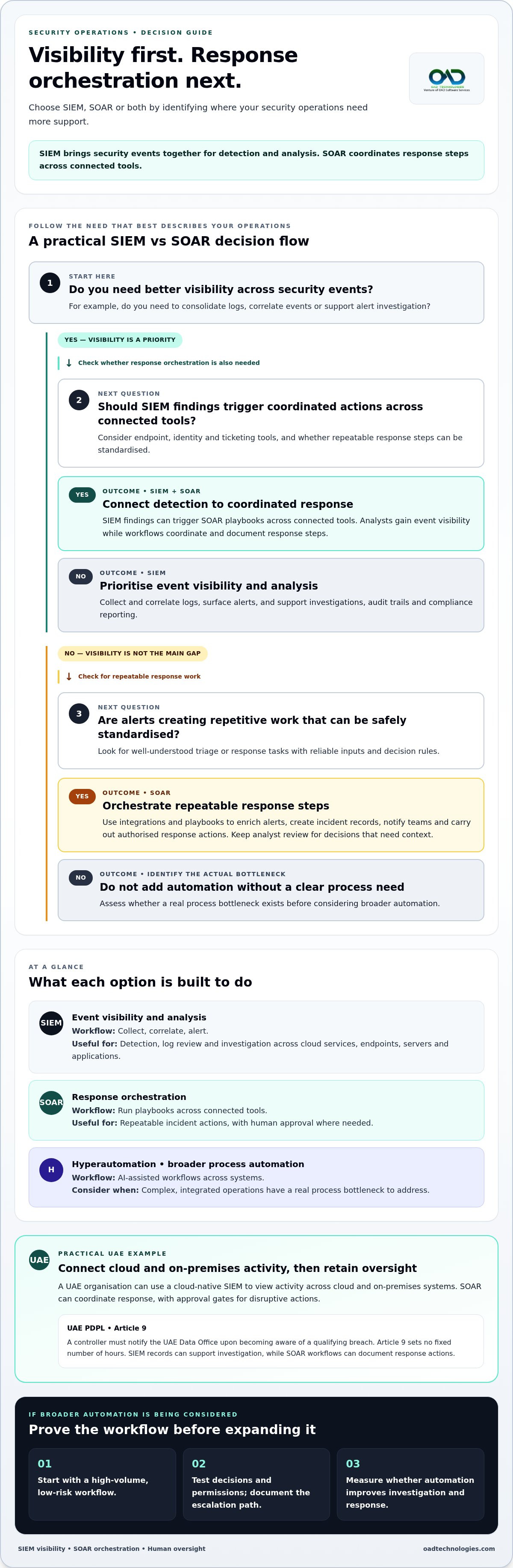
Choose SIEM when you need to consolidate logs, improve detection visibility or support investigations. Choose SOAR when existing alerts create repetitive triage and response work that can be safely standardised. Choose both when analysts need SIEM findings to trigger coordinated playbooks across endpoint, identity and ticketing tools.
In a UAE organisation, a cloud-native SIEM can help teams see activity across cloud and on-premises systems. SOAR can then coordinate responses, while approval gates preserve human oversight of disruptive actions.
Hyperautomation extends this model by linking AI-assisted detection with actions across multiple tools. AI can help compare alerts and context, while playbooks carry out defined response steps. Neither removes the need to test decisions and permissions. Start with a high-volume, low-risk workflow, document its escalation path and measure whether automation improves investigation and response.
For UAE compliance planning, map log access, retention and incident records to the organisation’s obligations and sector requirements. The UAE PDPL Article 9 requires a controller to notify the UAE Data Office upon becoming aware of a qualifying breach; it sets no fixed number of hours. SIEM records can support investigation, while SOAR workflows can document response actions.
Manual alert investigation versus automated workflows
Manual investigation gives analysts control over context, but repetitive alert handling can slow incident response. SOAR workflows connect alerts to defined enrichment, triage and response steps, retaining human review where decisions carry operational risk.
Automated Workflows and Alert Enrichment
A SOAR playbook turns a repeatable response procedure into a sequence of actions across connected security tools. For a suspicious email, it can check sender details against threat intelligence, gather message information and prioritise the alert for investigation. Analysts receive a more useful case instead of an isolated signal that must be reconstructed from scratch.
From there, the workflow can quarantine a confirmed phishing message, block its sender and search for similar emails in affected inboxes. Each action should depend on evidence gathered during enrichment, not merely an alert label. A task that might otherwise take an analyst 20 minutes can be automated when its inputs and decision rules are reliable.
Automation also changes the hand-off. A playbook can add its findings to an incident record, route uncertain cases to an analyst and log actions taken. This creates a traceable sequence for review, while manual investigation remains available for unusual events or conflicting evidence.
Low-Code Automation and Connectors
Low-code tools let analysts assemble workflows using visual steps and configurable conditions, rather than writing extensive code. Pre-built connectors can link a SOAR platform with endpoint protection, threat intelligence and ticketing systems. Unlike manual work across separate interfaces, a workflow passes relevant alert details between tools and records the resulting actions.
Connectors still need careful integration. Teams should map fields such as user identity, device name and alert severity, then test how each tool handles incomplete or duplicated data. For example, a missing device identifier should send an endpoint-isolation request for review, not trigger action against the wrong system.
Begin with a defined, low-risk alert type, such as a known phishing indicator. Document the trigger, enrichment sources, approval point, response action and escalation route. Run the workflow in a test environment, compare its decisions with analyst reviews, then refine the conditions before enabling automatic actions.
Implementation challenges often involve inconsistent alert formats, permissions and exceptions. A connector may pass an alert successfully but omit the context needed for safe action. Assign an owner to each playbook, record its authorised actions and define a fallback if an integration is unavailable. Review changes whenever connected tools or response procedures change.
For a UAE-based organisation handling cloud and on-premises alerts, a practical starting point is a phishing workflow that enriches cases and routes uncertain messages for human review. Measure whether triage becomes clearer and actions are recorded consistently. Expand automation only after the workflow behaves as intended across its connected tools.
SIEM and SOAR integration planning and implementation
Integration connects SIEM security data with SOAR workflows, allowing detection to inform coordinated action. Plan data flows, permissions and testing before connecting production systems.
Data Sources and Integration Planning
Start by mapping each source: cloud services, endpoints, identity systems, network devices and ticketing tools. For organisations managing complex deployments, collaborating with IT providers like Cloud Choice Technologies can ensure cloud infrastructure is properly configured to feed data cleanly. Record what security data each sends, how alerts identify users or assets, and which team owns the connection. This inventory reveals gaps before correlation rules or response workflows rely on incomplete information.
Vendor-agnostic SOAR can connect with multiple SIEM platforms and other security tools. Bidirectional integration lets SIEM events trigger SOAR workflows, while response outcomes and case details can flow back. Unlike a one-way alert feed, this can reduce the need for analysts to switch interfaces to understand what actions followed.
For each integration, define the fields and actions that pass through the connection. A cloud identity alert, for example, needs a consistent user identifier before a workflow can enrich it with directory context. Set permissions according to the task: reading alerts requires different access from disabling an account or isolating a device.
Then test the full path using simulations or a pilot. Confirm that a SIEM event reaches SOAR, enrichment adds the intended context and the resulting action appears in the incident record. Include duplicate alerts, missing fields and unavailable integrations. These cases show where security teams need a manual fallback.
Benefits of SIEM and SOAR Integration
Connected platforms can reduce gaps between detection and response by making SIEM alerts available to SOAR workflows. Correlation can group related events, while playbooks gather threat intelligence and coordinate actions across tools. Compared with separate consoles, a shared case gives analysts a clearer investigation trail and helps teams see what has already happened.
Integration also supports consistent reporting. Security teams can review detection time, response time, detection accuracy and incident-handling efficiency. These measures help determine whether a workflow is improving operations or simply shifting work between platforms.
AI-driven SOC processes need reliable inputs before automation can act. Provide models with clearly labelled alerts, relevant asset and user context, and threat intelligence. Keep decision thresholds, permissions and human approval points visible. If an AI system ranks an alert as severe, a playbook should still apply defined conditions before taking disruptive action.
Consider a UAE organisation with cloud workloads and an on-premises network. Map identity, endpoint and cloud alerts into the SIEM, then route a verified account compromise to SOAR for case creation and approved containment. Test that route in a pilot, review the audit trail and refine the integration before expanding it.
After deployment, assign owners to each connector and playbook. Review failures, data changes and access permissions as the environment evolves. This keeps bidirectional information useful, limits unintended actions and gives analysts a dependable path from security data to incident response.
SIEM log collection, analysis, and threat detection
SIEM detection quality depends on which logs an organisation collects, how it analyses them and how analysts tune its rules. These choices also shape storage needs, investigation effort and platform costs.
A SIEM gathers logs from sources such as network devices, endpoints, servers and applications. Syslog is a common protocol for transporting log data across enterprise networks. Useful records should retain their event time and originating system, giving analysts context when investigating suspicious activity.
Collection alone isn’t enough. Normalisation makes different log formats easier to compare, while correlation rules connect related events. For example, an unusual sign-in followed by a privileged account change may warrant investigation as a linked sequence, rather than as two unrelated alerts. Effective threat detection depends on relevant data and well-tuned analysis.
Storage and analysis serve different operational needs. Frequently accessed authentication events and critical system alerts can receive real-time attention, while lower-priority logs can be archived for later analysis. This helps teams focus processing on signals that support immediate threat detection while preserving records that may assist audits or forensic investigations.
Analysis engines need ongoing tuning. Analysts can review false positives, adjust filters and refine correlation rules when legitimate activity repeatedly triggers alerts. They should also test new rules against known events before deployment. Without this feedback, security tools can overwhelm teams with low-value alerts or miss activity their rules don’t recognise.
- Prioritise: identify critical systems, authentication events and high-value alerts.
- Validate: confirm timestamps, source identifiers and log coverage.
- Refine: use analyst findings to update rules and filters.
- Review: compare detection quality with incident investigation outcomes.
SOAR playbooks can handle defined follow-up tasks after SIEM detects a threat, such as enriching an alert or creating an incident record. Automation can reduce repetitive analyst work, but it doesn’t replace sound SIEM data or rule configuration. If the initial event is incomplete, a playbook may simply carry weak information through more workflows.
For a UAE organisation with cloud workloads and on-premises systems, prioritise identity, endpoint and critical application logs. Check that each record identifies its source and event time. Then tune detection rules to the organisation’s systems and investigate sample alerts before expanding collection.
SIEM and SOAR platform costs vary with data ingestion volume, retention needs, licensing model, integrations and implementation scope. A specific price depends on the requirements and is provided after a quote request.
SIEM, SOAR, and hyperautomation platform comparisons
These platforms differ in the work they coordinate, the security data they use and the actions they enable. A useful SIEM vs SOAR for security operations comparison starts with the operational gap, not the amount of automation available.
SIEM centres on visibility: it gathers and correlates event data so analysts can detect activity across systems. SOAR centres on security orchestration, applying playbooks to alerts and coordinating response actions through connected tools. Together, they link monitoring with response while keeping each platform focused on its core role.
Hyperautomation extends automation across connected workflows, often using AI to compare alerts with underlying security data and user or device behaviour. This can help prioritise investigation, but automated actions still need clear permissions and escalation paths. An AI-ranked alert is a signal for the workflow, not proof that every response should run without review.
| Platform approach | Primary capability | Visibility | Response role | Best fit |
|---|---|---|---|---|
| SIEM | Log collection and correlation | Broad event view | Alerts for analyst review | Detection and analysis |
| SOAR | Workflow orchestration | Connected alert context | Playbook-led actions | Repeatable response tasks |
| SIEM with SOAR | Monitoring plus orchestration | Events linked to cases | Alerts can initiate workflows | Joined detection and response |
| Hyperautomation | AI-assisted workflow execution | Context across integrated tools | Coordinated actions across processes | Complex, connected operations |
| XDR | Security data across the stack | Unified threat view | Prevention and remediation workflows | Cross-environment detection |
| EDR | Endpoint detection and response | Endpoint activity | Endpoint-focused response | Endpoint threat handling |
XDR differs from standalone SIEM or SOAR by bringing data ingestion, analysis, prevention and remediation across the security stack into a more holistic approach. EDR focuses on endpoint activity. For an organisation with cloud services, on-premises systems and endpoint tools, the practical question is whether those signals need a shared view, coordinated actions or both.
For a UAE organisation with cloud workloads and a local office network, SIEM can bring relevant activity into a detection view, while SOAR coordinates defined response actions. Hyperautomation becomes relevant when workflows span more systems and AI-assisted context can guide triage. Another way to frame SIEM vs SOAR for security operations is to identify which part of the process currently limits your team.
Assess data coverage, integration fit, analyst oversight and action records. Test a representative incident path from detection through response, then note where analysts still need to intervene. This practical assessment helps determine whether a combined deployment or broader automation addresses a real operational need.
OAD Technologies: Data Loss Prevention (DLP)
OAD Technologies helps organisations connect security operations decisions with the protection of sensitive information through Data Loss Prevention (DLP) and Security Information and Event Management (SIEM). SIEM supports visibility into security events; DLP is relevant when the priority is reducing the risk of sensitive data being exposed or mishandled. For a UAE organisation reviewing its monitoring and response processes, these capabilities address related but distinct security needs.
Turn to DLP when data protection is a central concern, or consider SIEM when teams need stronger event visibility and investigation support. OAD Technologies also provides Managed Detection and Response (MDR) and Vulnerability Assessment and Penetration Testing (VAPT) for related security needs.
Contact OAD Technologies to discuss the right fit for your security operations.
Shape Your Next Security Operations Decision
A considered SIEM vs SOAR choice for security operations should start with the capability your team needs to strengthen next. Set a clear operational priority, then align data visibility, response processes and human oversight around it. This creates a practical foundation for evolving security operations without adding automation that doesn’t solve a defined need.
OAD Technologies can support related priorities through Managed Detection and Response (MDR), Vulnerability Assessment and Penetration Testing (VAPT), and Data Loss Prevention (DLP). These offerings address different needs, from detection and response support to identifying vulnerabilities and protecting sensitive information. The next step is to connect your operational priorities with the security capabilities that fit them.
Start with a clear view of your current processes, integration needs and data protection priorities. With the right direction, your security operations can develop in step with your organisation’s environment and risk priorities.
Move forward with a focused plan to strengthen your team’s ability to protect the organisation.
Frequently Asked Questions
What are the Benefits of SIEM?
SIEM can help analysts establish a timeline of activity during an investigation. For example, they can compare an unusual access event with approved maintenance or a change in user permissions, then assess whether the event needs escalation. Searchable records can also support internal reviews by showing how activity developed. The benefit depends on whether the collected information is relevant to the systems and questions the organisation needs to investigate.
What are the Benefits of SOAR?
SOAR can help teams organise incoming work by prioritising alerts, assigning ownership and tracking unresolved tasks. This is useful when an incident moves between analysts or requires input from different teams. A shared case can make pending decisions and completed work easier to follow. These capabilities support consistent handling of defined procedures, while unusual incidents still require people to interpret context and decide on an appropriate response.
What is the difference between SIEM and SOAR?
SIEM centres on security-event analysis, while SOAR centres on coordinating operational response tasks. To compare them in practice, assess SIEM by the relevance and quality of its event coverage. Assess SOAR by how well its workflows handle routine cases and route exceptions. This distinction helps teams evaluate each platform against its intended role, rather than comparing products solely by feature count or automation claims.
How do SIEM and SOAR work together in security operations?
They work together when an event identified through monitoring becomes a managed incident with clear ownership. For example, an analyst can review a suspicious privileged-access event, use a SOAR case to coordinate follow-up and retain responsibility for the final assessment. Define who can approve disruptive actions and who closes the incident record. This prevents automated task completion from being mistaken for a fully resolved security issue.
What are the core features of SIEM platforms?
Core SIEM features typically include searchable event records, configurable detections, dashboards, reporting and controls for log retention. For an operations manager, the practical test is whether analysts can answer common investigation questions without manually assembling evidence from unrelated systems. Check whether reports make event sources and timestamps clear, and whether detection rules can be adjusted as business systems and legitimate activity change.
What are the core features of SOAR platforms?
Core SOAR capabilities commonly include incident queues, playbook management, case records, task assignment, approval points and action histories. Together, these features help teams track who handled a case and which decisions remain open. During evaluation, consider how analysts can review exceptions and update procedures after an incident. A platform should make operational decisions visible, so teams can explain why a workflow took a particular action.
What are the benefits and limitations of SIEM vs SOAR?
SIEM is useful for broad security-event analysis, while SOAR is useful for coordinating defined operational procedures. Neither resolves weak incident ownership or poor process design by itself. SIEM needs ongoing attention to data quality and detection logic; SOAR needs maintained workflows and integrations. Organisations should account for the people who will manage each platform, review outcomes and adapt procedures as the technology environment changes.
How do you integrate SOAR with SIEM and other security tools?
Plan integration around identity, access and failure handling as well as data exchange. Use dedicated permissions for connected tools, limit each connection to the actions its workflow needs, and record who can approve sensitive changes. Test what happens when a connector times out or returns incomplete information. Assign responsibility for monitoring integration health so failed data transfers or stalled actions are noticed and handled through an established process.
Disclaimer
Content by OAD Technologies is for general informational purposes only and does not constitute professional or cybersecurity advice. No warranties are made regarding accuracy or completeness; reliance is at your own risk. OAD Technologies shall not be liable for any direct or indirect losses arising from use of this content.